10 OpenArt Features Every AI Influencer Creator Must Know
Most people building an AI influencer hit the same wall around week three. The face changes. Not dramatically — just enough that the audience half-notices, the comments get weird, and the whole illusion starts to leak. That’s the actual job. Not making one pretty image. Making the same person show up, believable and identical, across…

By :
Andrea Obrien
September 25, 2026
Most people building an AI influencer hit the same wall around week three. The face changes. Not dramatically — just enough that the audience half-notices, the comments get weird, and the whole illusion starts to leak.
That’s the actual job. Not making one pretty image. Making the same person show up, believable and identical, across fifty posts, a dozen videos, three languages, and a brand deal. And that’s the exact problem the OpenArt features set is built to solve.
I spent a full stretch inside the platform with one goal: figure out which features actually matter for someone running an AI persona as a business, and which ones are just changelog noise. I built characters, gave them a home, sent them through Director, dubbed them into other languages, and tried to break the consistency at every step.
Here’s the honest rundown — every feature, what it really does, and whether it earns a spot in your workflow.
OpenArt Features at a Glance: What Actually Matters
Before the deep dive, here’s the whole toolkit triaged the way I’d rank it for an AI influencer specifically.
| Feature | What It Does | Matters for Influencers? |
|---|---|---|
| Character | Consistent, reusable AI persona from one reference | Non-negotiable. This is the whole game |
| Worlds | Persistent 3D environment your character lives in | Huge for a believable, recurring setting |
| Director | Chat-driven video up to 5 minutes, fully coherent | The flagship. Justifies the subscription |
| Smart Shot | One prompt → 3–5 cinematic cuts | High. Makes clips look edited, not generated |
| AI Image Generator + editing | Generate and fix stills in one canvas | Daily bread for feed content |
| AI Video Generator | Text/image-to-video, 100+ models | Core output engine |
| VFX & editing suite | Motion Sync, relight, background swap, upscale | Big. You finish here, not in a separate editor |
| Audio + Lip Sync | Voice in 30+ languages, music, cloning | Gives your persona an actual voice |
| Video Dubbing | Translate a video with matched mouth movement | Quietly multiplies your reach |
| Brand Kit | Locks logo, colors, fonts into every generation | Serious once you take brand deals |
| Model library | 100+ image, video, audio engines, one credit pool | The structural advantage |
Now let’s get into the ones that carry the weight.
Character: The Feature That Makes or Breaks Everything
I’ll be blunt. If Character doesn’t work, nothing else on this list matters, because you don’t have an influencer — you have a slideshow of vaguely similar strangers.
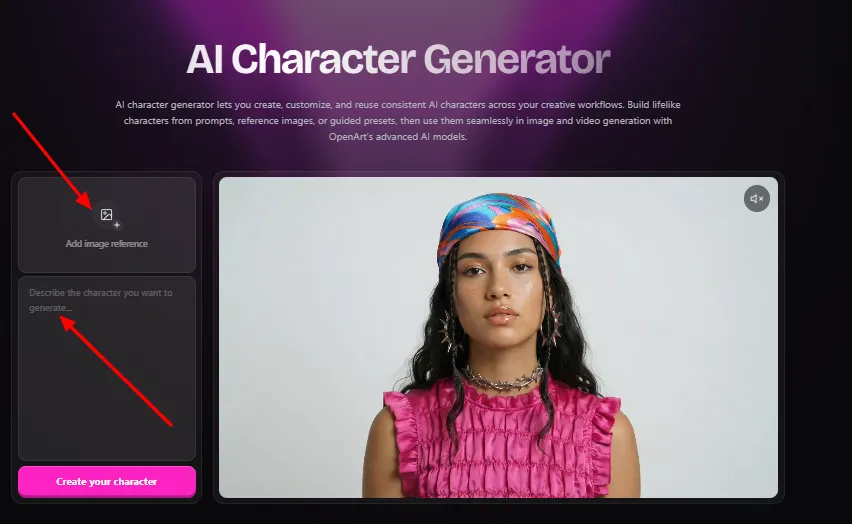
OpenArt’s AI character generator lets you build a persona once and reuse it forever. And it gives you three ways in, depending on how much control you want:
Once your character exists, you save it to your library and reuse it across every image and video by referencing it. Same face in a studio portrait, a street-style shot, and a cinematic clip — without redefining anything. It runs on the strong models too, including Nano Banana Pro, Seedream 4.0, and Kling 3.0 Omni, so you can jump from photoreal to stylized without losing recognizability.
Does it matter?
It’s the single most important feature for this use case. In testing, the same persona held identity across close-ups, wide shots, and lighting changes far better than raw prompt-to-image anywhere else. The friction of “matching” old generations simply disappears — your influencer becomes a saved asset, not a lucky roll of the dice.
The honest catch: OpenArt runs on models that update fast, and character work is where changes get noticed first. Test your key persona thoroughly before you build a whole content calendar on it, and keep your best reference images backed up.
Save 15% on Your AI Character
Build a character once, keep her look consistent, and save 15% on OpenArt with code ALL15.
Worlds: Give Your Influencer a Home That Doesn’t Move
Consistency isn’t only the face. It’s the place. If your persona’s apartment looks different in every post, the audience feels it even if they can’t name it.
Worlds fixes that. You generate a large, persistent, fully navigable 3D environment from a single prompt or reference images. Not one background — an actual space. Then you drop your character inside, add objects and props, shoot stills from any angle within it, or export the whole environment to specialized 3D tools.
Paired with Character, this is where the magic compounds. Your creator walks through the same café in post one and post sixty, and it reads as the same café because it is. That’s the difference between a persona floating in random AI backdrops and one who visibly lives somewhere your audience gets familiar with.
Does it matter?
More than most people realize. A stable environment does as much for believability as a stable face, and almost nobody using AI tools bothers with it. That’s your edge.
Director: The Feature That Justifies the Whole Subscription
If you test one thing, test Director. It’s the closest OpenArt has to a signature feature, and it changes how video actually gets made.
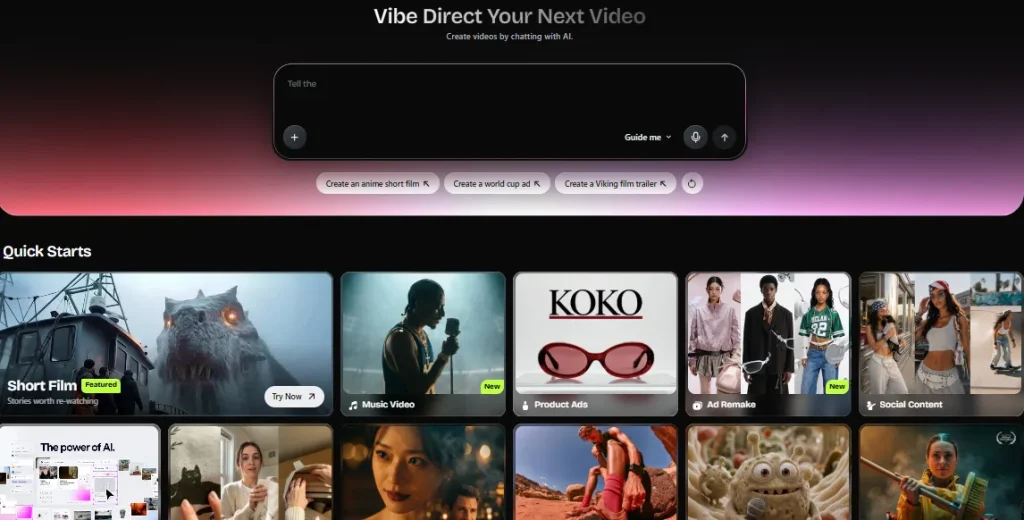
Traditional AI video is a slot machine — prompt, four seconds, face drift, rewrite, repeat, quit. Director throws that out. You brief it in plain language, the way you’d brief a human editor, and refine by chatting. Here’s what it can actually do, straight from testing:
The workflow is three steps: describe your idea (add a reference image, a soundtrack, a voice, or a guide video if you want), take the director’s seat and refine the characters, story, and scenes by chatting, then watch it come to life — and if you dislike a single frame or the whole thing, you just tell it what to change and it changes only that.
It covers ads, micro-dramas, film trailers, music videos, UGC, and marketing pitches — every format an influencer actually ships — and it’s powered by Seedance 2.0, GPT Image 2, and more.
Does it matter?
It’s the flagship, and it earns it. Conversational direction with persistent memory beats prompt roulette by a wide margin, and the five-minute coherent output is something most competitors can’t touch.
The money reality: Director generations cost real credits. The move is drafting your whole film in the cheaper Lite quality modes, locking the shot plan, then rendering only the final at full quality. Drafting at premium quality is the fastest way to empty your balance.
Smart Shot: One Prompt, a Sequence That Looks Edited
Sitting next to Director is Smart Shot, and the two play different roles. Director is a conversation. Smart Shot is a one-shot cinematic generator.
Describe a scene once, and Smart Shot turns it into three to five distinct cuts — wide establishing shots, close-ups, and transitions between them — so the output feels like a real edited sequence instead of one static clip. Here’s what’s under the hood:
Does it matter?
For influencers, yes. It’s the fast path to content that looks directed rather than generated — an establishing shot, a mid, a reaction — all with the same face. OpenArt even calls out AI influencers and character content as a core use case, and after testing it, that’s fair.
AI Image Generator and the Editing Suite: Your Daily Feed Engine
OpenArt started as an image platform, and it shows. This is where your daily posts, thumbnails, and carousels come from.
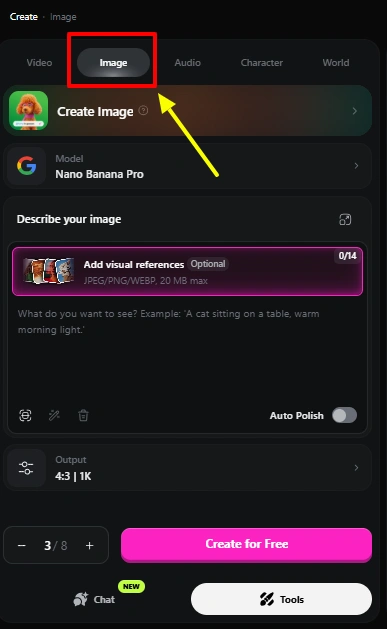
You generate text-to-image across the strong models — photoreal portraits, cinematic scenes, anime, product mockups — with control over aspect ratio, resolution up to 4K, and style. Drop in a reference and the likeness carries.
But the editing is where it separates from single-purpose generators, because it all happens in the same canvas:
Does it matter?
Absolutely — for a creator it means one imperfect generation becomes a finished post without ever opening Photoshop. Wrong background, swap it. Awkward crop, extend it. Soft image, upscale and sharpen. One place, no export dance.
AI Video Generator: Your Persona in Motion
Static builds a following; video grows it. OpenArt’s video generator brings text-to-video, image-to-video, and full VFX editing into one place, running on Seedance 2.5, Veo 3.1, Kling 3.0, Gemini Omni, and Wan 2.7, among others.
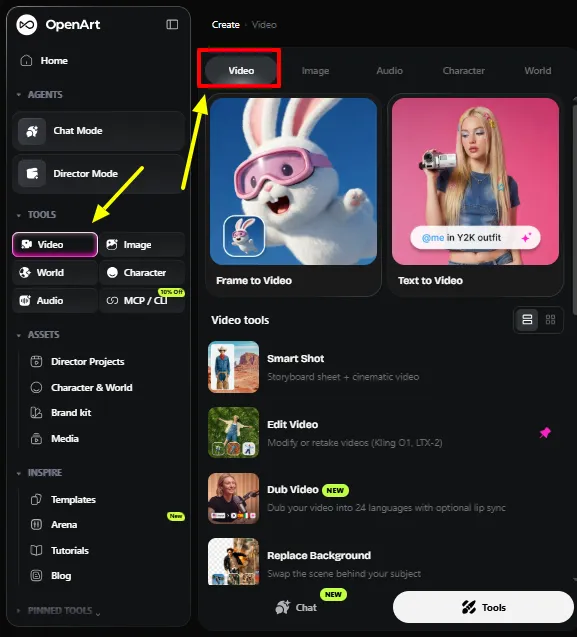
The parts that matter for influencer work:
Does it matter?
It’s the core output engine, and the fact that it plugs directly into your consistent Character and your Worlds environment is what makes it more than a novelty.
The VFX and Editing Suite: Where You Actually Finish
Generating clips is table stakes now. The editing layer is where real content gets finished, and OpenArt’s is deep:
Motion Sync — upload a reference clip of any movement (a trending dance, a walk, a gesture) and it retargets onto your character, matching posture and pacing frame by frame. Swap just the face, just the body, or rebuild the scene. Gold for riding trends without generating believable motion from scratch.
OpenArt VFX (SwitchX) — background replacement, full-scene relighting, and region-level effects on footage you already have. Mask what stays, prompt the rest, and only that region changes across every frame. No green screen, no reshoot.
Relight Video — change the entire mood with cinematic lighting while keeping character and motion intact. Flat daytime clip becomes a moody evening one, no regeneration.
Video Inpaint — mask what to protect, transform everything else from one prompt.
Video Upscale — Topaz Labs-powered, up to 8K with frame interpolation to 120 FPS, so finals look premium.
Does it matter?
Yes, because nothing leaves the platform mid-project. That workflow continuity — no exporting, no re-uploading, no version chaos — saves more real time than any single flashy tool.
Audio, Voice, and Lip Sync: Giving Your Persona a Voice
An influencer that never speaks is limited. The audio tools handle that entirely in-platform.
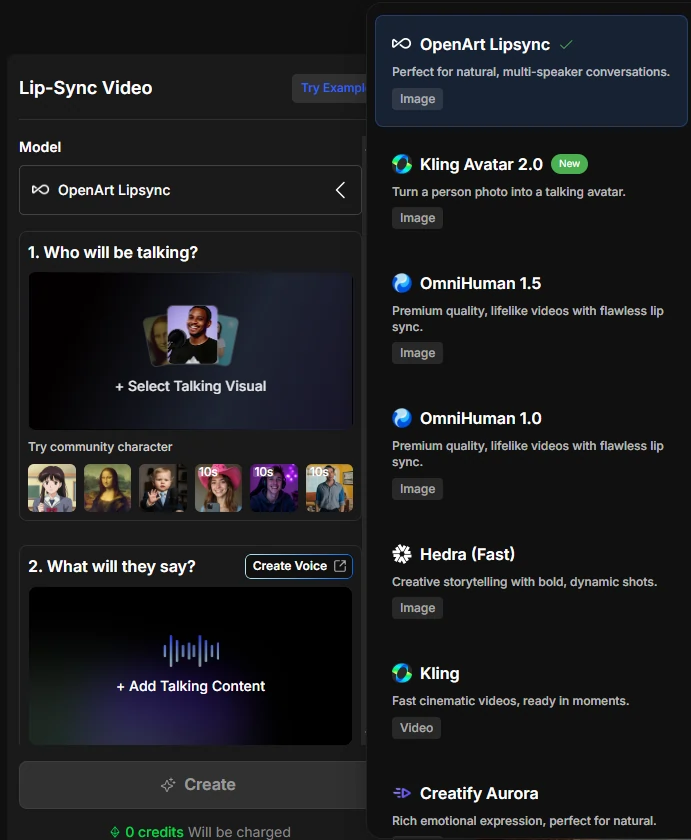
You generate voiceovers in 30+ languages with lip-sync, clone a voice from a reference sample or pick presets (so your persona keeps one consistent voice), score scenes with original music in any genre, and layer sound effects like footsteps or rain. Everything exports as WAV or MP3, timed to your video.
Lip Sync deserves its own mention — it’s central to believable talking content, with multiple engines to match a script or your own recording to your character’s mouth.
Does it matter?
For any talking-head or narrative persona, it’s essential. A consistent cloned voice is the audio equivalent of a consistent face.
Video Dubbing: The Feature That Quietly Doubles Your Reach
This one is easy to overlook and shouldn’t be. Video Dubbing translates an existing video into another language with natural voices and matched mouth movement, so it plays like it was shot that way.
Make one video, dub it into several languages, each with synced lips. Your persona effectively becomes multilingual, and every piece you’ve already made becomes a candidate for re-release in new markets.
Does it matter?
More than its billing suggests. Few features offer this much leverage on work you’ve already done — for a global influencer play, it’s a genuine multiplier.
Brand Kit: For When the Deals Start Coming
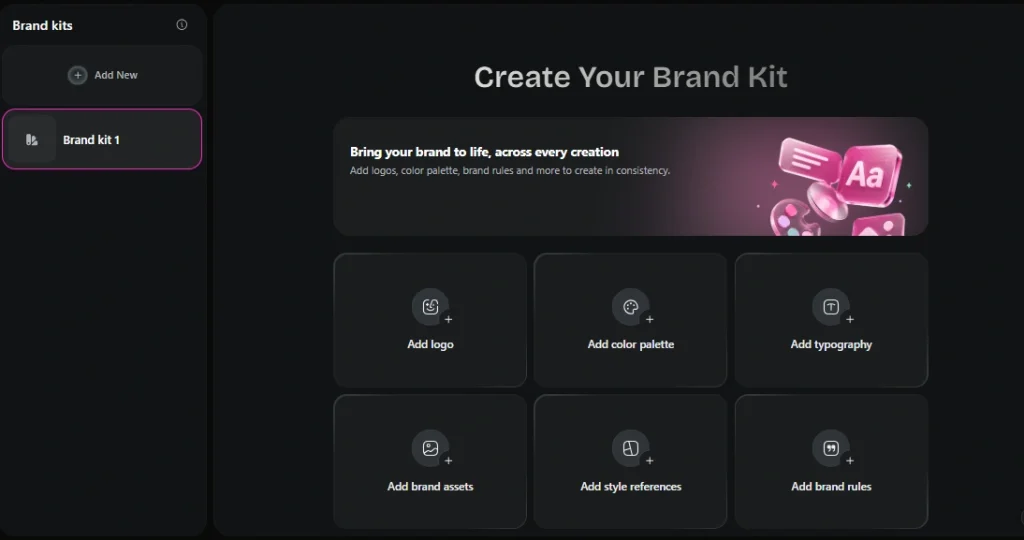
Once you’re monetizing, Brand Kit separates a real operation from a hobby. You save six things once — logo, color palette, typography, brand assets, style references, and brand rules — and it applies them to every generation in that project automatically.
The clever part: your colors, fonts, and rules live in the text layer, so they apply even to models with only two reference slots, and even to text-only models where image references have nowhere to go.
When reference slots run tight, you set a priority (logo, product, mascot, style, or palette) and Brand Kit protects that first, then tells you what it dropped instead of silently swapping. You can save a generation you like back into the kit so it gets stronger over time, and each kit stays isolated to its own project — so separate clients or campaigns never bleed into each other.
Does it matter?
For brand collabs and consistent visual identity, yes. It moves the brand definition out of every prompt and into a layer the model checks every time, so colors and type stop drifting across a campaign.
The Model Library and Business Layer
The structural feature under everything: OpenArt doesn’t lock you into one house model. It aggregates 100+ image, video, and audio engines behind one credit pool and one prompt bar.
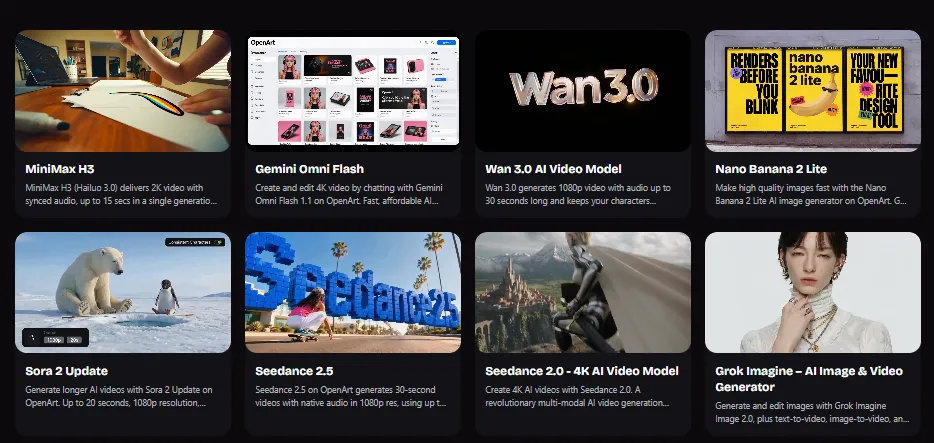
Video runs on Seedance 2.5, Sora 2, Veo 3, Kling 3.0 and its Motion Control variant, Wan 3.0 and 2.7, MiniMax H3, LTX-2.3, PixVerse, Grok Imagine, Gemini Omni Flash, FLUX 3, HappyHorse, and SwitchX. Images run on Nano Banana 2 and Pro, GPT Image 2, Seedream 5.0 Pro, Qwen Image 3, Wan 2.7 Image, Recraft V4, and more.
Here’s the picking cheat sheet I settled on for influencer work:
| Your Job | Reach For |
|---|---|
| Readable text — logo, poster, packaging | GPT Image 2 or Nano Banana Pro |
| Photoreal persona and product shots | Nano Banana 2 or Seedream 5.0 Pro |
| Cinematic motion with expressive character | Seedance 2.5 |
| Longer narrative with native audio | Kling 3.0 or Sora 2 |
| Physics-heavy realism and dialogue | Veo 3 or Sora 2 |
| Fast, cheap iteration drafts | Wan 3.0 or Hailuo Fast mode |
| Editable brand vectors and logos | Recraft V4 |
Two business features round it out. OpenArt MCP (on paid tiers) lets you generate images and video from inside your own AI agent or automation stack, turning OpenArt into a callable service rather than a place you visit — genuinely useful if you’re semi-automating a content pipeline, and almost nobody mentions it.
Team billing invites collaborators onto one invoice with pooled credits and shared workspaces, for when your persona becomes a small team effort.
Getting the Most From These Features
A few things worth knowing before you lean on the full toolkit, learned the expensive way during testing.
Premium high-resolution video burns credits fast, so draft in Lite quality and render finals only. That one habit stretches a plan further than any other trick on the platform.
The character models update often, which is great for quality but means results can shift between versions, so lock your best reference images and re-test a persona before you schedule a month of content around it.
Fast motion, dense crowds, and text on props can still wobble, so favor cleaner compositions when consistency matters most. And since OpenArt is web-based with no mobile app, plan to produce at a desktop rather than on the go.
None of these are dealbreakers. They’re just the difference between burning through credits guessing and running your persona like an operation that actually ships.
A Real Influencer Workflow, Start to Finish
Features in isolation don’t tell you much. Here’s how they actually chain into one post:
Build your persona once in Character from a single reference and save her. Generate her apartment in Worlds and save that too. For a new video, brief Director in plain language — casual day-in-the-life, 9:16, warm tone — with your saved character and environment locked in, so she appears as herself in her own space.
Refine the pacing by chatting. Add her cloned voice and lip sync a line. Draft the whole thing in Lite quality to save credits, approve it, render the final. Run Video Dubbing to release it in two more languages, apply your Brand Kit to any sponsored elements, and export.
Casting, set, direction, voice, localization, brand safety, export — one browser tab. That collapse of a whole production chain is the real argument for the platform. No single feature is magic alone; the integration is.
OpenArt Features FAQs
Which OpenArt feature matters most for an AI influencer?
Character. Consistent identity across every post is what makes a persona believable, and it works from a single reference image, then reuses across all your images and videos. Everything else builds on it.
Can OpenArt keep both my character and their setting consistent?
Yes. Character locks the persona while Worlds generates a persistent, navigable 3D environment to place them in repeatedly. Together they give your influencer a stable face and a stable home.
What’s the difference between Director and Smart Shot?
Director is conversational and handles long, multi-scene narrative video up to five minutes, refined by chatting. Smart Shot turns a single prompt into a 3–5 cut cinematic sequence automatically. Most creators use both.
Can my AI influencer speak more than one language?
Yes. Voiceovers generate in 30+ languages with lip-sync, and Video Dubbing translates an existing video into other languages with matched mouth movement — so one video reaches several markets while the persona keeps a consistent cloned voice.
Do I need other tools alongside OpenArt?
Rarely. Image editing, video VFX, background swaps, relighting, upscaling, audio, and dubbing all happen inside one workspace with a shared asset library, which is the point of the platform.
Is it safe for paid brand deals?
On tiers with commercial rights, yes — and Brand Kit plus the platform’s IP tooling help keep output on-brand and lower infringement risk. Run checks before any sponsored campaign and avoid generating recognizable copyrighted characters.
Final Take: A Feature Set That Runs a Whole Operation
OpenArt’s real strength isn’t any single headline tool. It’s that the features are engineered to work as one system for exactly the person building an AI influencer. Character solves identity, Worlds solves environment, Director and Smart Shot solve direction, the video and image engines plus the editing suite solve output and polish, the audio tools give your persona a voice, dubbing multiplies your reach, and Brand Kit plus MCP let you run it like a business.
For anyone tired of stitching together four subscriptions and praying the character still looks like herself, that integration is the value. Learn the OpenArt features in the order your workflow needs them — persona first, then environment, then direction, then audio and localization — and you’re not generating content anymore. You’re running a production line for a character that can carry a brand.
Start with your persona in Character, give her a home in Worlds, and build outward. Everything else in the toolkit exists to make that character move, speak, travel, and sell.

AITwin Ninja
Affiliate Disclosure: This post may contain some affiliate links, which means we may receive a commission if you purchase something that we recommend at no additional cost for you (none whatsoever!)
Similar Posts
Author
Andrea Obrien
I specialise in writing about AI influencers and AI agents, empowering creators to build sustainable online incomes. Outside of work, I enjoy travelling, photography, and exploring the latest trends in digital innovation.