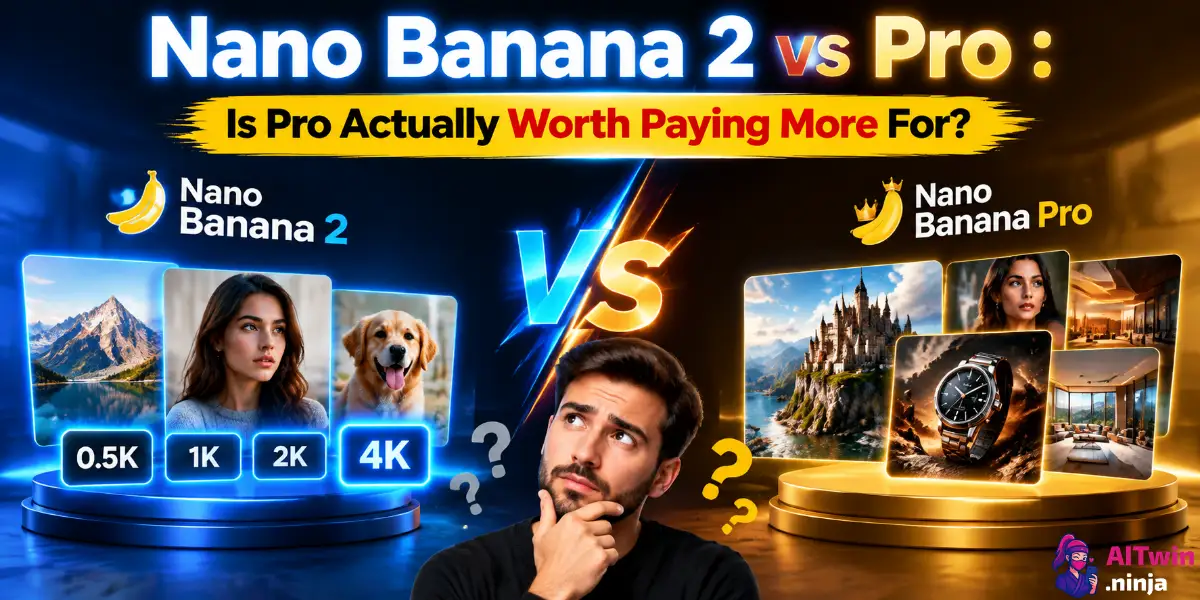
Nano Banana 2 vs Pro (2026): Is Pro Actually Worth Paying More For?
Google has made its AI image lineup slightly confusing. Nano Banana 2 sounds newer. Nano Banana Pro sounds better. Both can generate and edit images, handle text inside graphics, work with reference images, create high-resolution output and use Google-powered grounding. So which one should you actually use? The short answer: Nano Banana 2 is the…

By :
Andrea Obrien
September 30, 2026
Google has made its AI image lineup slightly confusing.
Nano Banana 2 sounds newer. Nano Banana Pro sounds better. Both can generate and edit images, handle text inside graphics, work with reference images, create high-resolution output and use Google-powered grounding.
So which one should you actually use?
The short answer: Nano Banana 2 is the smarter choice for most people in 2026. Nano Banana Pro still wins when the image needs maximum precision, complex composition, stronger brand consistency or professional production quality.
The price difference makes that decision even easier.
A standard 1K Nano Banana 2 image costs about $0.067 through the Gemini API, compared with roughly $0.134 for Nano Banana Pro. At 4K, the gap narrows: Nano Banana 2 costs around $0.151 per image, while Pro costs $0.24.
That means Pro isn’t simply “Nano Banana 2 but better.” They are aimed at different jobs.
Nano Banana 2 is Google’s Gemini 3.1 Flash Image model, built around speed, volume and a lower cost per generation. Nano Banana Pro is Gemini 3 Pro Image, built for harder visual instructions and professional asset creation.
Here’s where your money actually goes.
Nano Banana 2 vs Pro Comparison: Specs, Pricing and Key Differences
| Feature | Nano Banana 2 | Nano Banana Pro |
|---|---|---|
| Official model | Gemini 3.1 Flash Image | Gemini 3 Pro Image |
| Model ID | gemini-3.1-flash-image | gemini-3-pro-image |
| Best for | Everyday generation, editing, high-volume workflows | Complex professional image production |
| Standard 1K image cost | ~$0.067 | ~$0.134 |
| Standard 2K image cost | ~$0.101 | ~$0.134 |
| Standard 4K image cost | ~$0.151 | ~$0.24 |
| Batch 1K cost | ~$0.034 | ~$0.067 |
| Batch 2K cost | ~$0.050 | ~$0.067 |
| Batch 4K cost | ~$0.076 | ~$0.12 |
| Text/image input pricing | $0.50 per 1M tokens | $2 per 1M tokens |
| Image output pricing | $60 per 1M tokens | $120 per 1M tokens |
| Maximum output | 4K | 4K |
| 0.5K output | Yes | No dedicated 0.5K tier |
| Google Search grounding | Yes | Yes |
| Google Image Search grounding | Yes | No equivalent combined image-search feature listed |
| Thinking | Yes | Yes |
| Multiple reference images | Strong | Strong |
| Text rendering | Very good | Best suited to precision-heavy graphics |
| Speed | Faster | Slower on complex jobs |
| High-volume API use | Excellent | Expensive |
| Complex graphic design | Very good | Excellent |
| Product mockups | Very good | Excellent |
| Best value | Winner | — |
| Maximum quality/control | — | Winner |
Quick verdict: If you’re opening an AI image generator and aren’t already sure that you need Pro, start with Nano Banana 2. It covers far more everyday image generation jobs at a much lower API cost.
Pro earns its name when mistakes become expensive.
What Is Nano Banana 2?
Nano Banana 2 is the public nickname for Gemini 3.1 Flash Image, Google’s newer Flash-based image generation and editing model.
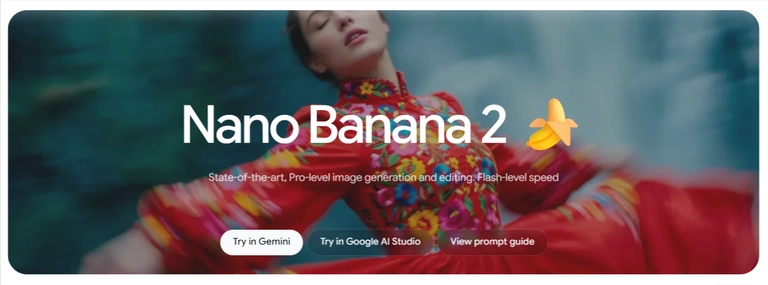
Think of it as the workhorse.
It can create images from text prompts, modify uploaded pictures through conversational instructions, work with reference images, render text, use real-world information and produce output from 0.5K through 4K.
The big change from Google’s older Flash image models is that speed no longer means settling for obviously weaker output.
Nano Banana 2 supports:
That’s a serious feature list for a model costing $0.067 for a standard 1K API generation.
Nano Banana 2 also became Google’s recommended general-purpose option rather than a stripped-down alternative sitting underneath Pro.
That’s an important distinction.
You aren’t picking the “cheap bad model” against the “expensive good model.”
You’re picking the fast generalist against the specialist.
What Is Nano Banana Pro?
Nano Banana Pro is Gemini 3 Pro Image.
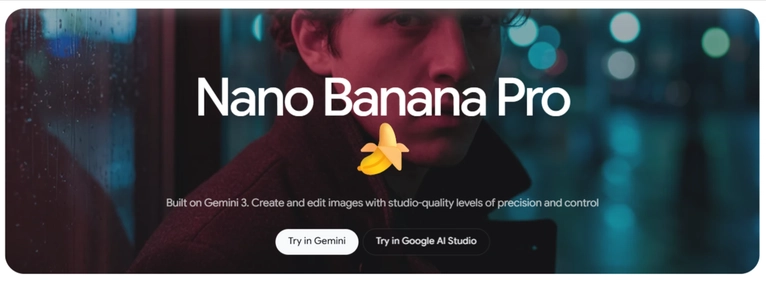
This is Google’s premium image generation model for jobs where visual accuracy matters more than cost or raw generation speed.
Pro puts more emphasis on reasoning before creating the final image. That becomes useful when prompts contain several instructions that all need to survive into one composition.
Picture a basic request:
Create a cinematic photo of a red sports car on a rainy Tokyo street.Nano Banana 2 is perfectly comfortable with it.
Now turn that into:
Create a premium billboard campaign showing this exact product bottle beside three ingredients, preserve the original label, place the supplied headline in the upper-right corner, match the reference brand colors, retain the specified packaging proportions and create a realistic reflection beneath the bottle.That’s the sort of prompt where Pro starts making more sense.
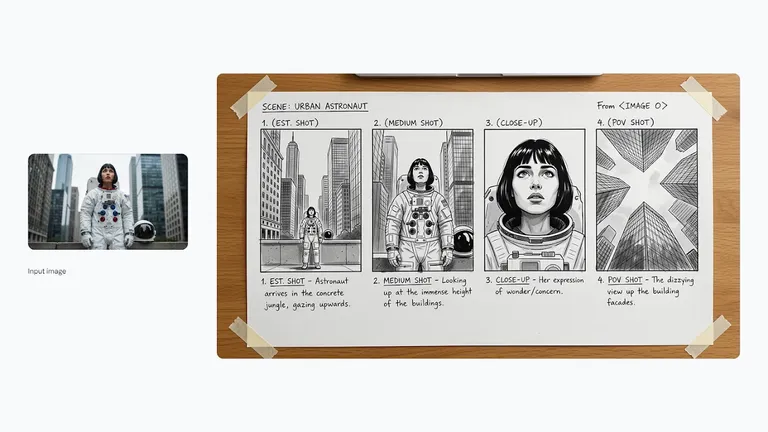
Google positions Nano Banana Pro around professional asset production, complex graphic design, high-fidelity product mockups, accurate brand consistency, factual visualizations and precise creative control.
And that explains the price.
Nano Banana 2 vs Nano Banana Pro Pricing: The Difference Gets Big at Scale
Here’s the part that matters to developers, AI tool builders and anyone generating more than a handful of images.
Nano Banana 2 is substantially cheaper.
Standard API image pricing
| Resolution | Nano Banana 2 | Nano Banana Pro | Cheaper Model |
|---|---|---|---|
| 0.5K | $0.045 | — | Nano Banana 2 |
| 1K | $0.067 | $0.134 | Nano Banana 2 |
| 2K | $0.101 | $0.134 | Nano Banana 2 |
| 4K | $0.151 | $0.240 | Nano Banana 2 |
The 1K difference is particularly brutal.
Nano Banana Pro costs approximately 2x as much per image.
Generate 100 standard 1K images and you’re looking at roughly:
Push that to 10,000 generations:
That’s a $670 difference before accounting for other token usage.
For an individual creator, $0.067 versus $0.134 doesn’t look dramatic.
For an AI headshot tool, ecommerce image generator, virtual try-on platform, ad creative app, thumbnail generator or automated content workflow, it absolutely does.
Batch Pricing Makes Nano Banana 2 Even More Attractive
Google also offers Batch API pricing at roughly half the standard image-output cost.
Nano Banana 2 batch generation comes in at approximately:
Nano Banana Pro batch pricing is:
This creates an interesting situation.
A batch 4K Nano Banana 2 image costs only around $0.076.
That’s barely more than the standard $0.067 price of a 1K Nano Banana 2 generation.
And it’s dramatically below Pro’s standard 4K cost of $0.24.
For non-urgent jobs such as generating ecommerce catalogs overnight, processing marketing assets, creating article graphics or building image datasets, Batch can cut the bill considerably.
Image Quality: Pro Wins Where the Prompt Gets Hard
This is where comparison articles tend to get lazy.
Pro produces better images, therefore Pro wins.
Not quite.
The useful question is:
How often does Pro’s extra quality actually matter?
For straightforward text-to-image prompts, social graphics, thumbnails, portraits, illustrations and basic image edits, Nano Banana 2 can get close enough that paying more for every generation makes little sense.
The gap becomes easier to justify as prompt complexity rises.
Nano Banana 2 is strongest for
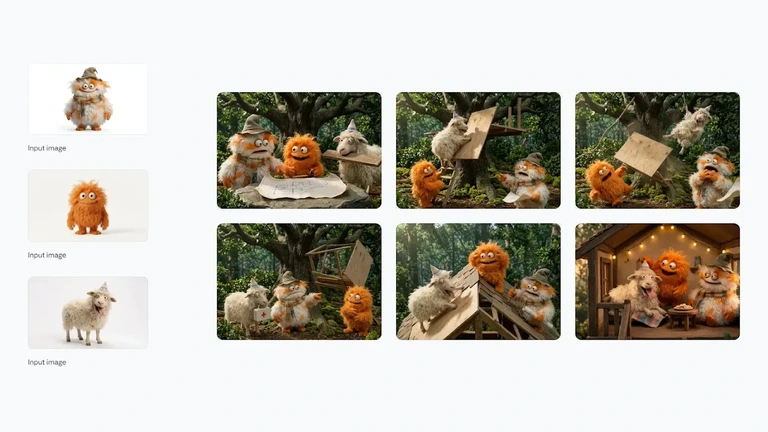
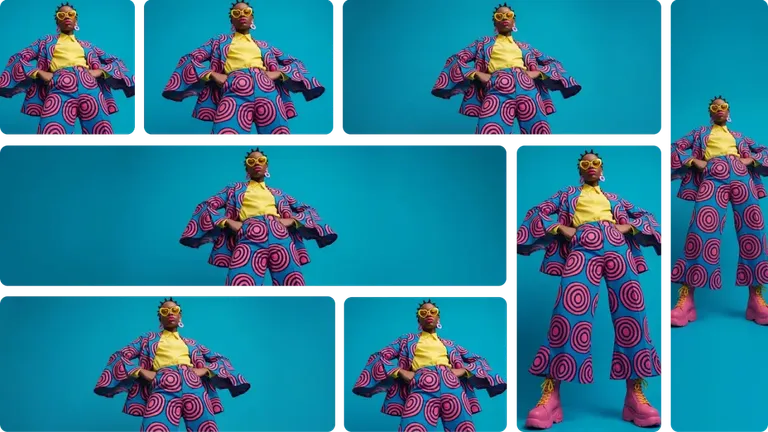
Nano Banana Pro earns its cost for
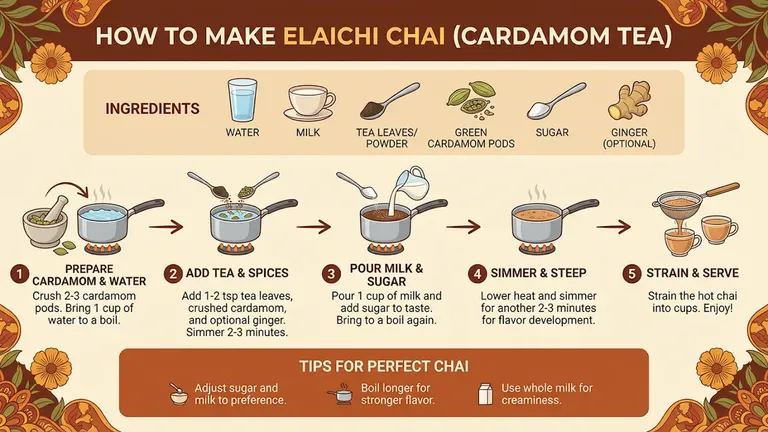
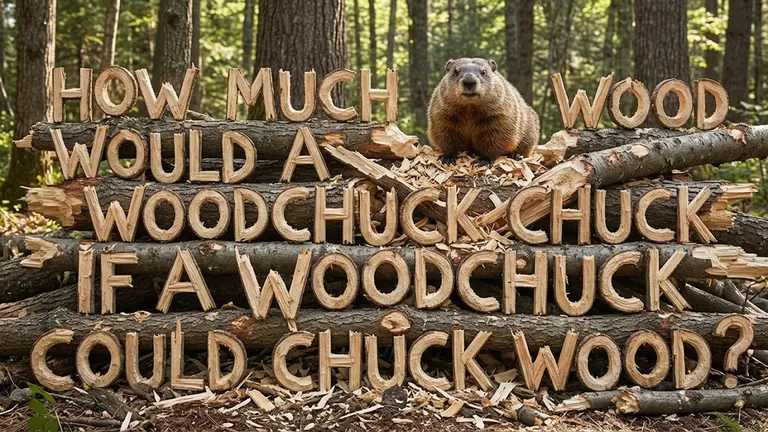
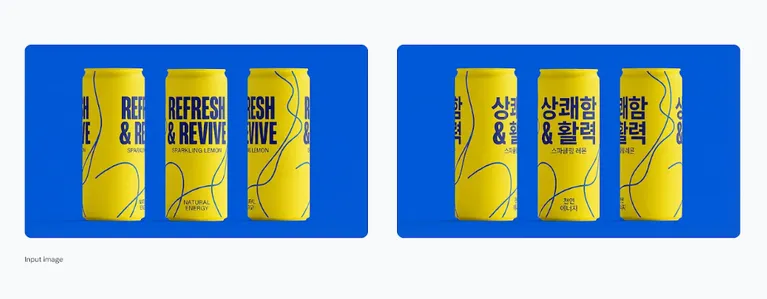
So yes, Pro wins image quality.
But Nano Banana 2 wins the much more useful quality-per-dollar fight.
Nano Banana 2 Is Faster — and That Changes How You Actually Work
Image quality gets all the screenshots. Latency gets ignored.
Until you’re sitting there waiting for version 17.
Nano Banana 2 belongs to Google’s Flash family for a reason. It’s designed for low latency and high-throughput image generation.
That changes the workflow.
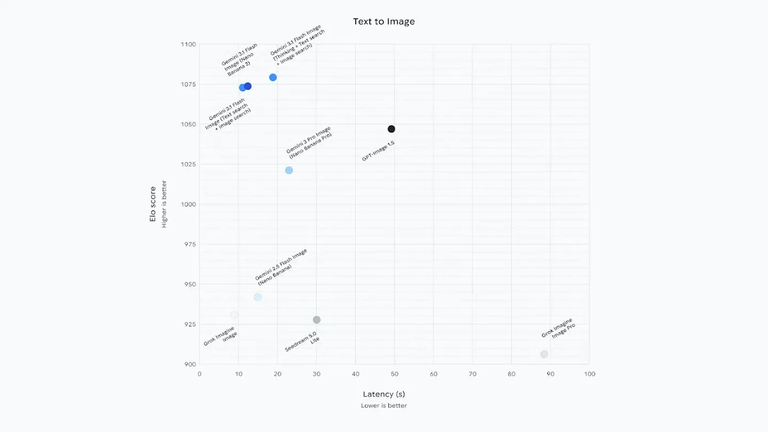
Instead of obsessing over one giant prompt, you can iterate:
That rapid back-and-forth is exactly where a fast image model becomes more enjoyable than a technically stronger one.
It’s also critical inside apps.
If you’re building an AI photo editor and users expect near-immediate feedback, shaving generation time matters. People tolerate waiting for a professional render. They get annoyed waiting for a simple background edit.
Speed winner: Nano Banana 2
4K Generation No Longer Gives Pro an Automatic Win
Nano Banana Pro used to have an obvious premium argument: serious high-resolution output.
Nano Banana 2 changed that.
It now supports 4K generation, alongside 0.5K, 1K and 2K options.
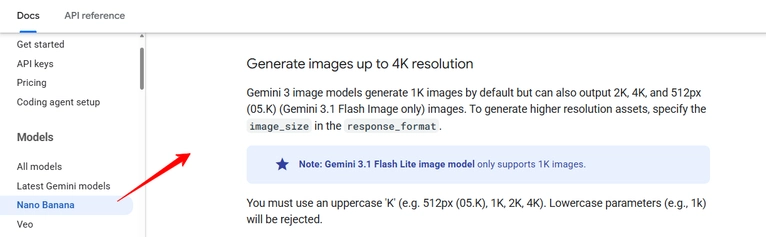
This makes resolution a much weaker reason to pick Pro.
If all you need is a 4096-class high-resolution output, you don’t automatically need Google’s premium image model anymore.
The difference now comes down to what happens inside those pixels.
Pro remains the stronger pick for complex professional compositions.
Nano Banana 2 simply removes the idea that cheaper output has to mean low-resolution output.
Image Editing: Nano Banana 2 Might Be the Better Everyday Editor
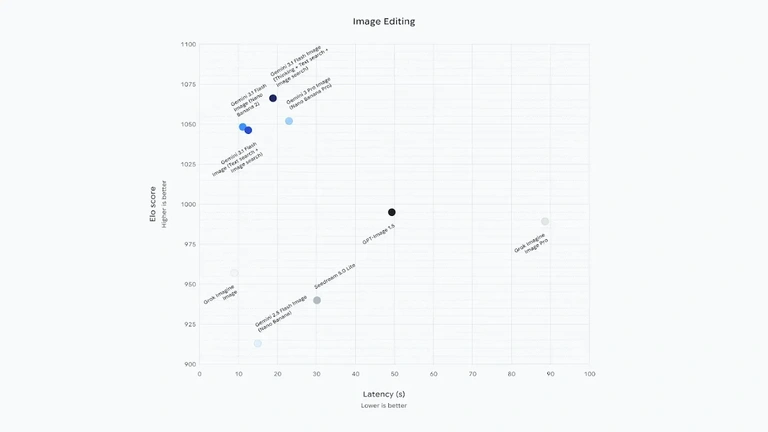
Text-to-image gets attention, but conversational image editing may be Nano Banana 2’s more useful trick.
You can provide an existing image and describe what needs changing instead of rebuilding it manually.
For example:
Keep the person exactly the same but replace the office background with a modern studio.Then:
Make the lighting warmer without changing the face.Then:
Turn this into a 16:9 website hero and leave negative space on the left for text.This multi-turn workflow is ideal for creators who aren’t trying to produce one perfect generation from scratch.
Nano Banana 2 is particularly attractive here because the lower price makes repeated edits less painful.
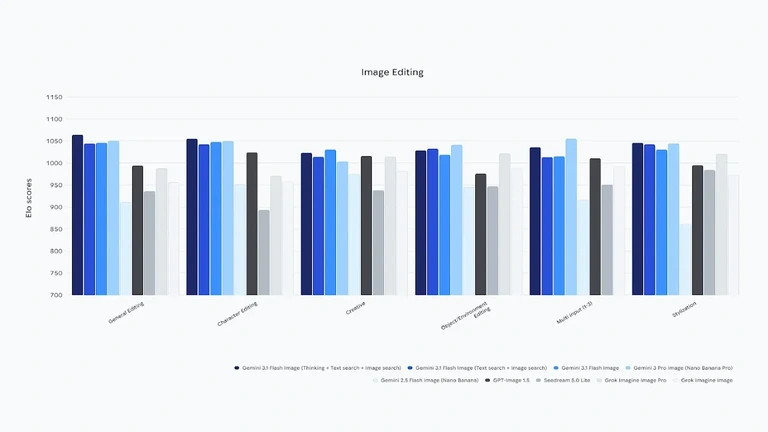
Five attempts on Pro can cost more than the final image itself feels worth.
With Nano Banana 2, experimentation is cheaper.
For everyday AI photo editing, background changes, object replacement, social media resizing and creative variations, we’d pick Nano Banana 2.
Character Consistency: Which Nano Banana Model Keeps Faces Better?
Character consistency matters far beyond AI portraits.
Creators increasingly need the same person across:
Nano Banana 2 was built with subject consistency as a core strength and performs especially well when several reference images are involved.
Pro still has the advantage when character consistency is only one part of a larger, highly constrained composition.
Here’s the easiest way to separate them.
Need the same character across lots of images? Nano Banana 2 makes more financial sense.
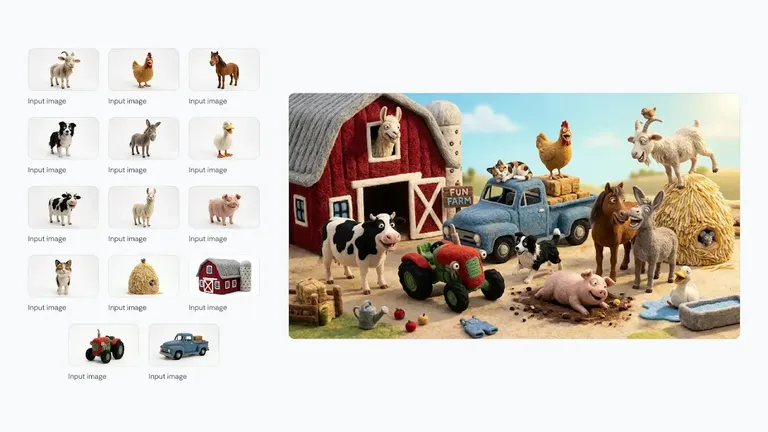
Need the same character, exact branded clothing, specific text, controlled placement, several products and a strict commercial composition? Pro becomes more attractive.
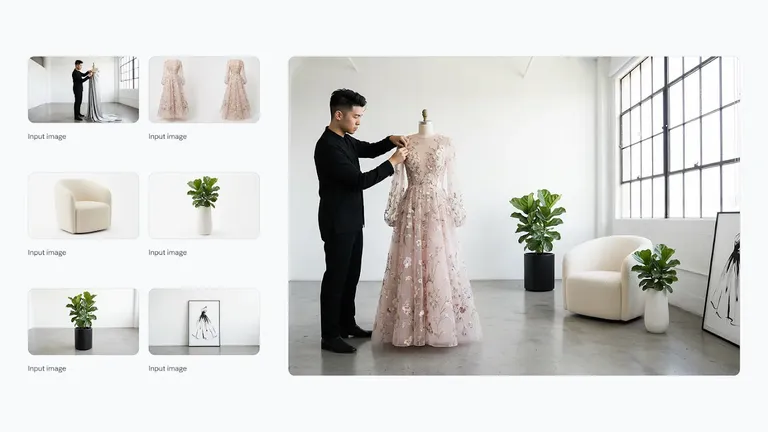
That’s the recurring pattern throughout this comparison.
Complexity pushes the decision toward Pro.
Volume pushes it back toward Nano Banana 2.
Text Rendering: Nano Banana Pro Still Has a Reason to Exist
AI image generators used to treat text like alphabet soup.
Things are much better now.
Nano Banana 2 has improved multilingual and in-image text rendering, making it usable for posters, simple ads, banners, mockups and social graphics.
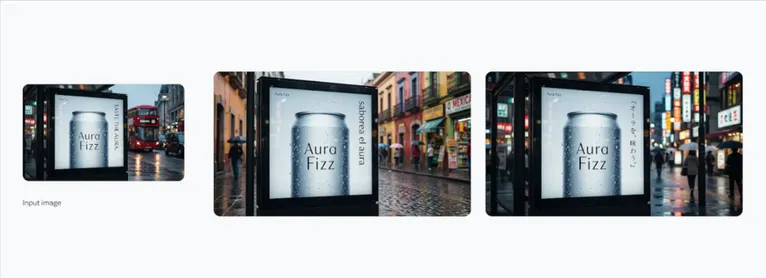
Pro remains the safer option when typography is central to the image.
Think:
If a misspelled label means throwing away the generation, paying extra for Pro can actually save money.
For a background image with a three-word headline? Nano Banana 2.
For a product package containing several text elements that need to survive accurately? Pro.
Text rendering winner: Nano Banana Pro
Google Search Grounding Is a Bigger Deal Than It Sounds
Both models can use Google Search grounding.
That allows generated images to incorporate current or factual information instead of depending only on static model knowledge.
Nano Banana 2 goes further with grounding through both Google Web Search and Google Image Search.
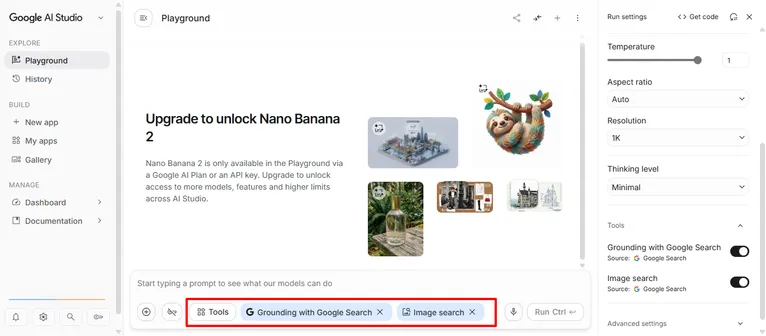
This is especially useful for visual prompts tied to real things.
Think current products, locations, animals, fashion references, famous landmarks, recent visual information and other subjects where reference accuracy matters.
For developers, grounding has separate economics to consider.
Google currently provides 5,000 free search requests per month shared across Gemini 3.x models, after which search grounding costs $14 per 1,000 requests.
So don’t calculate your production cost using image output alone if every request triggers grounding.
A high-volume app can accumulate grounding charges separately from generation costs.
Reference Images and Complex Prompts: This Is Where the Fight Gets Interesting
Modern AI image generation isn’t just:
Prompt → picture.
Real workflows increasingly look like:
Prompt + product photo + character reference + style image + logo + previous generation → final asset.
Nano Banana 2 handles multiple reference images and consistency remarkably well for its price class.
Pro takes the edge when all those references come with strict relationships.
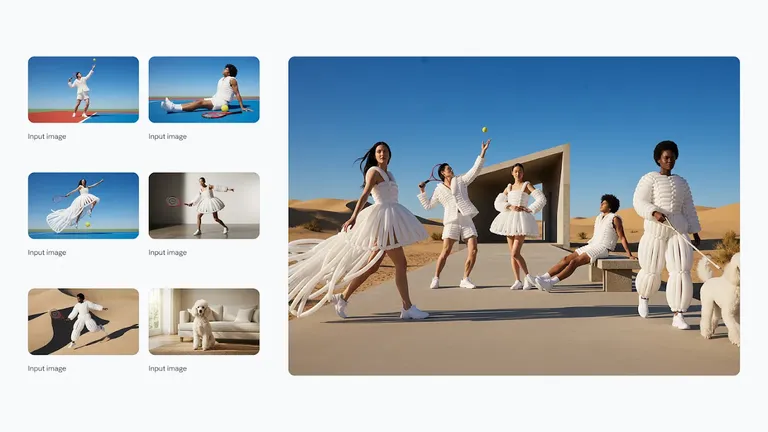
For example, you may need:
- The exact person from reference one.
- The jacket from reference two.
- The product from reference three.
- The visual direction of reference four.
- A supplied logo left untouched.
- A fixed headline.
- A specific composition.
That’s no longer basic image generation.
It’s closer to giving an AI model an art-direction brief.
Pro is built for that kind of headache.
Best Choice for AI Influencers and Virtual Characters
For AI influencer creators, Nano Banana 2 is probably the more practical model.
Why?
Volume.
An AI influencer workflow may require dozens of attempts before one image gets published. You might test outfits, locations, poses, camera angles, expressions and crops.
Paying Pro pricing every single time adds up quickly.
Nano Banana 2 gives creators:
Lower generation costs + strong subject consistency + fast iteration + 4K output + reference-image support.
That’s an unusually good combination for AI character production.
A smarter workflow is to use Nano Banana 2 for the bulk of your generations and reserve Pro for hero shots, sponsored creatives or complicated scenes.
You don’t have to marry one model.
Which One Is Better for Ecommerce Product Images?
Ecommerce is much closer.
If you’re producing thousands of straightforward product variations, Nano Banana 2 wins on economics.
For example:
But brand accuracy can flip the result.
If the AI keeps slightly changing a logo, bottle shape, package text or physical dimensions, cheap generations become expensive rejected generations.
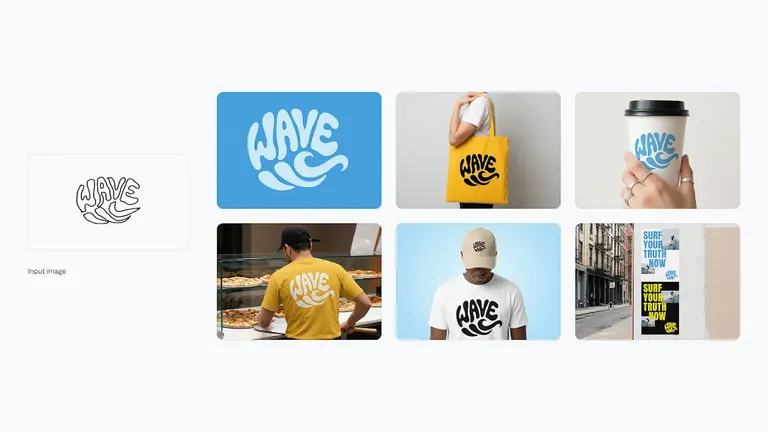
Nano Banana Pro makes more sense for premium product mockups and marketing assets where the supplied product must stay visually faithful.
So the winner depends on the cost of an error.
- Large catalog production: Nano Banana 2
- Hero product campaign: Nano Banana Pro
For Developers, Start With Nano Banana 2
Developers have a much easier decision.
Start with Nano Banana 2.
Its model ID is:
gemini-3.1-flash-image
Nano Banana Pro uses:
gemini-3-pro-image
Nano Banana 2 has a larger 131,072-token input limit compared with Pro’s 65,536-token input limit, while both list a 32,768-token output limit.
More importantly, Nano Banana 2 is explicitly positioned for high-volume developer use.
At standard pricing, text/image input costs $0.50 per million tokens, compared with $2 per million for Pro.
Image output is priced at $60 per million tokens on Nano Banana 2 versus $120 per million on Pro.
If you’re building an app where users can hammer the Generate button repeatedly, those numbers matter.
Use Pro selectively rather than making it your default endpoint.
When Should You Actually Pay for Nano Banana Pro?
Pay more for Pro when the image has a job to do beyond looking good.
That’s the cleanest rule.
If you’re creating a commercial visual where accuracy, typography, brand consistency or composition affects revenue, Pro’s extra cost becomes easier to justify.
Use Nano Banana Pro when:
In those situations, saving seven cents isn’t the goal.
Getting the image right is.
When Is Nano Banana 2 the Better Buy?
For almost everything else.
Nano Banana 2 is especially hard to beat when your workflow involves iteration.
You want it for:
It isn’t merely cheaper.
Its pricing structure encourages you to use the model differently.
The Best Workflow Uses Both Models
Here’s the part most comparisons miss.
You don’t need to pick one forever.
The best production setup can use both.
Stage — Build with Nano Banana 2
Generate concepts, compositions, character poses, backgrounds and rough campaign directions cheaply.
Stage — Iterate with Nano Banana 2
Fix the prompt until the overall idea works.
There’s little reason to burn Pro generations while you’re still deciding between a blue wall and a beige one.
Stage — Move difficult finals to Pro
If the final image requires precise text, branding, packaging or complex multi-reference instructions, switch the finished prompt and assets to Pro.
Stage — Keep easy finals on Nano Banana 2
If Nano Banana 2 already produces a clean result, stop.
Don’t pay extra because “Pro” looks nicer in the model selector.
This hybrid approach gives you Pro quality only where it earns its keep.
What 1,000 Images Actually Cost
Let’s put the API numbers into something less abstract.
1,000 standard 1K images
Nano Banana 2: about $67
Nano Banana Pro: about $134
Difference: $67
1,000 standard 2K images
Nano Banana 2: about $101
Nano Banana Pro: about $134
Difference: $33
1,000 standard 4K images
Nano Banana 2: about $151
Nano Banana Pro: about $240
Difference: $89
Now look at Batch.
1,000 batch 1K images
Nano Banana 2: about $34
Nano Banana Pro: about $67
1,000 batch 4K images
Nano Banana 2: about $76
Nano Banana Pro: about $120
This is why model selection matters much more for API products than casual Gemini users.
At 10 images, nobody cares much.
At 100,000 images, somebody in finance definitely does.
Which Model Wins Each Category?
| Category | Winner |
|---|---|
| Overall value | Nano Banana 2 |
| Generation speed | Nano Banana 2 |
| Cheapest 1K output | Nano Banana 2 |
| Cheapest 2K output | Nano Banana 2 |
| Cheapest 4K output | Nano Banana 2 |
| Bulk image generation | Nano Banana 2 |
| Everyday image editing | Nano Banana 2 |
| AI influencer workflows | Nano Banana 2 |
| Fast iteration | Nano Banana 2 |
| Web + image grounding | Nano Banana 2 |
| Maximum professional quality | Nano Banana Pro |
| Complex graphic design | Nano Banana Pro |
| Brand-sensitive production | Nano Banana Pro |
| High-fidelity product mockups | Nano Banana Pro |
| Typography-heavy assets | Nano Banana Pro |
| Complex multi-instruction prompts | Nano Banana Pro |
| Overall winner for most users | Nano Banana 2 |
Nano Banana Pro collects fewer wins, but they’re important wins.
It’s the specialist.
Nano Banana 2 is the model you’ll probably use more often.
Nano Banana 2 vs Pro FAQs
Is Nano Banana 2 better than Nano Banana Pro?
Nano Banana 2 is better for speed, price, bulk generation and everyday image editing. Nano Banana Pro is stronger for complex professional graphics, brand accuracy and precision-heavy visual work.
Is Nano Banana 2 newer than Nano Banana Pro?
Yes. Nano Banana 2 is Gemini 3.1 Flash Image, released after Gemini 3 Pro Image, which powers Nano Banana Pro.
How much does Nano Banana 2 cost?
Through the Gemini API, standard Nano Banana 2 image output costs about $0.045 at 0.5K, $0.067 at 1K, $0.101 at 2K and $0.151 at 4K.
How much does Nano Banana Pro cost?
Standard Nano Banana Pro API output costs about $0.134 for 1K or 2K images and $0.24 for 4K images.
Is Nano Banana 2 cheaper than Nano Banana Pro?
Yes. Nano Banana 2 costs roughly half as much as Pro for a standard 1K image and remains cheaper at 2K and 4K.
Can Nano Banana 2 generate 4K images?
Yes. Nano Banana 2 supports 0.5K, 1K, 2K and 4K output resolutions.
Does Nano Banana Pro support 4K?
Yes. Nano Banana Pro can generate images at up to 4K resolution and is aimed at professional image production.
Which is better for AI image editing?
Nano Banana 2 is the better everyday editor due to its speed, conversational editing and lower generation cost. Pro is preferable for complex professional edits.
Which model is better for AI influencers?
Nano Banana 2 makes more sense for most AI influencer workflows because character production usually requires many generations and revisions.
Which is better for product photography?
Nano Banana 2 works well for high-volume product variations. Nano Banana Pro is the stronger option for premium mockups where packaging, text and brand consistency must remain precise.
Does Nano Banana 2 support Google Search?
Yes. Nano Banana 2 supports grounding with Google Web and Image Search, helping it work with current real-world visual information.
Is Nano Banana Pro worth the extra cost?
It is worth paying for when accuracy and creative control matter more than generation volume. For routine images and repeated edits, Nano Banana 2 gives better value.
What is the Nano Banana 2 API model name?
Nano Banana 2 uses the Gemini API model ID gemini-3.1-flash-image.
What is the Nano Banana Pro API model name?
Nano Banana Pro uses gemini-3-pro-image.
Can developers use both Nano Banana 2 and Pro?
Yes. In fact, using Nano Banana 2 for drafts and routine generations while reserving Pro for difficult final assets can reduce API costs without giving up Pro when it matters.
Final Verdict: Nano Banana 2 Wins for Most People in 2026
Nano Banana 2 makes the “Pro or cheap model?” question far less obvious than it used to be.
Google gave its Flash image model 4K output, strong text rendering, multi-reference processing, conversational editing, subject consistency, thinking support and search grounding while keeping API prices considerably below Pro.
That’s enough to make Nano Banana 2 the better default Google AI image generator in 2026.
At around $0.067 for a standard 1K image, it costs half as much as Nano Banana Pro. Its speed also makes repeated editing and experimentation much less frustrating.
Nano Banana Pro still has a clear purpose.
Pick Pro for professional graphic design, exacting product mockups, typography-heavy creative, strict branding, factual visualizations and complicated prompts where every instruction needs to land correctly.
For everything else, start with Nano Banana 2.
And if you’re building an image-generation product through the Gemini API, the smartest setup may be simpler still:
Nano Banana 2 by default. Nano Banana Pro when the job actually deserves it.

AITwin Ninja
Affiliate Disclosure: This post may contain some affiliate links, which means we may receive a commission if you purchase something that we recommend at no additional cost for you (none whatsoever!)
Similar Posts
Author
Andrea Obrien
I specialise in writing about AI influencers and AI agents, empowering creators to build sustainable online incomes. Outside of work, I enjoy travelling, photography, and exploring the latest trends in digital innovation.