How to Land Your First Subscriber on Fanvue as an AI Creator
No audience. No track record. No clue where to start. Sound familiar? Getting your first subscriber on Fanvue as an AI creator feels like shouting into a void — but it really isn’t. Most creators who quit never had a system. They posted a few AI images, set a random price, and waited. That’s not…

By :
Andrea Obrien
March 31, 2026
No audience. No track record. No clue where to start. Sound familiar?
Getting your first subscriber on Fanvue as an AI creator feels like shouting into a void — but it really isn’t.
Most creators who quit never had a system. They posted a few AI images, set a random price, and waited. That’s not a strategy. That’s a wish.
This guide is the opposite of that. It’s a step-by-step, no-fluff breakdown of exactly how to go from zero to one paying fan on Fanvue — and then keep going.
Build Your AI Character Before You Even Open Fanvue
Biggest rookie mistake? Jumping straight into image generation without knowing who your AI model actually is.
Before you create a single photo, nail down these basics:
Trying to appeal to everyone is the fastest way to appeal to no one. Pick a lane.
Stick to it. Document your character’s backstory, interests, and communication style in a simple notes doc so every post, caption, and DM stays consistent.
Quick gut check: if you can’t describe your AI model’s personality in two sentences, you’re not ready to launch.
Set Up a Fanvue Profile That Does the Selling for You
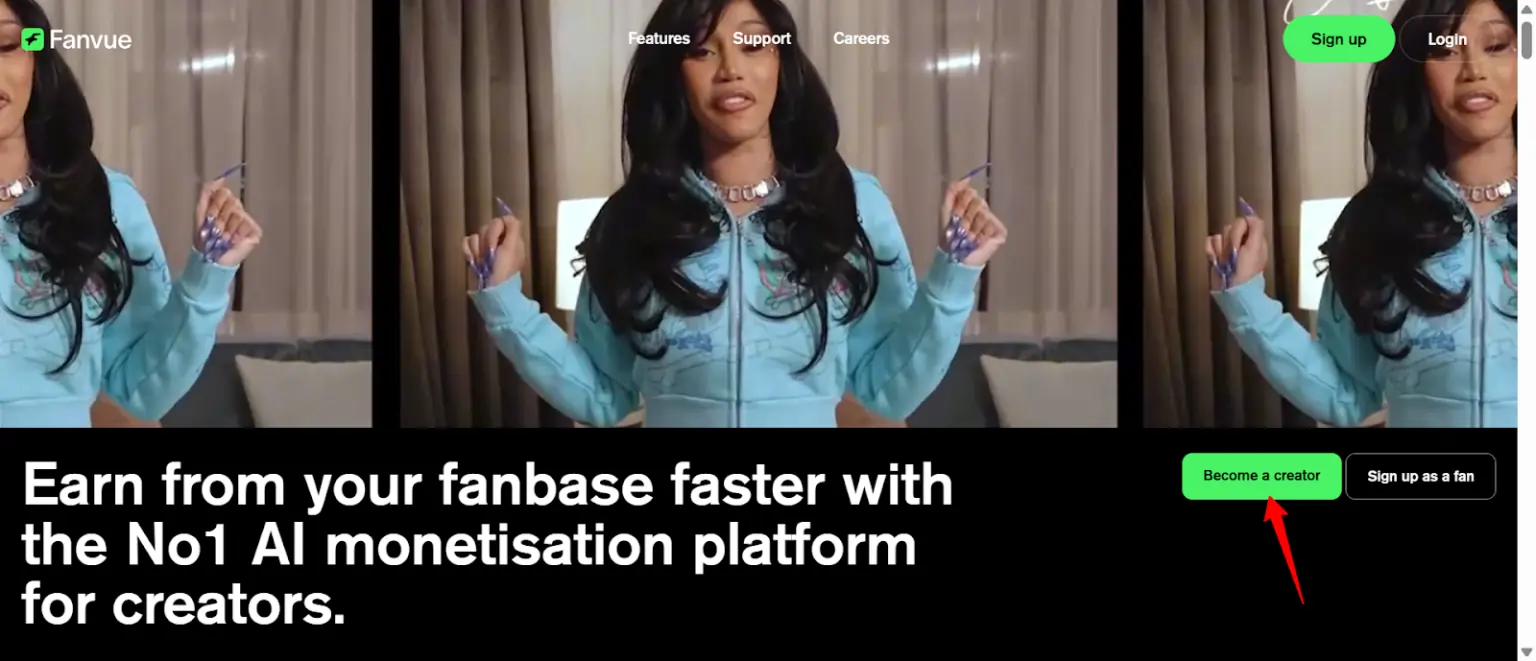
Your profile is doing the heavy lifting 24/7 — even when you’re asleep. Treat it like a landing page, not a social media bio.
Profile Picture + Banner
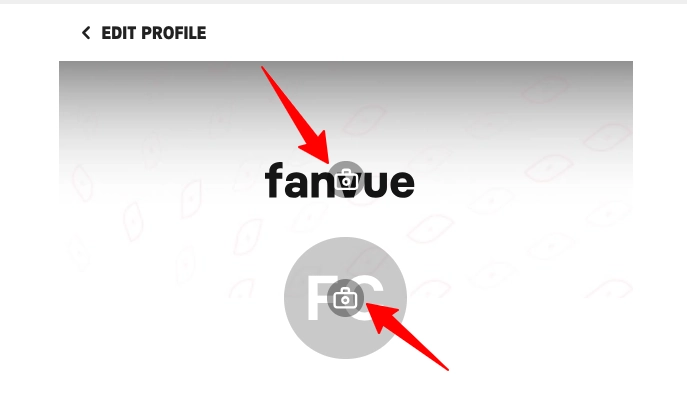
Your profile picture needs to be a clear, high-quality AI-generated image. Eye contact, clean background, no clutter. This is the first thing people see in search results and recommendations.
Your banner (1920×480px) is your billboard. Use it wisely — a teaser-level image with simple overlay text like “Exclusive content inside 🔥” or “Subscribe to see more” works better than a plain photo every time.
Bio That Hooks in 3 Seconds
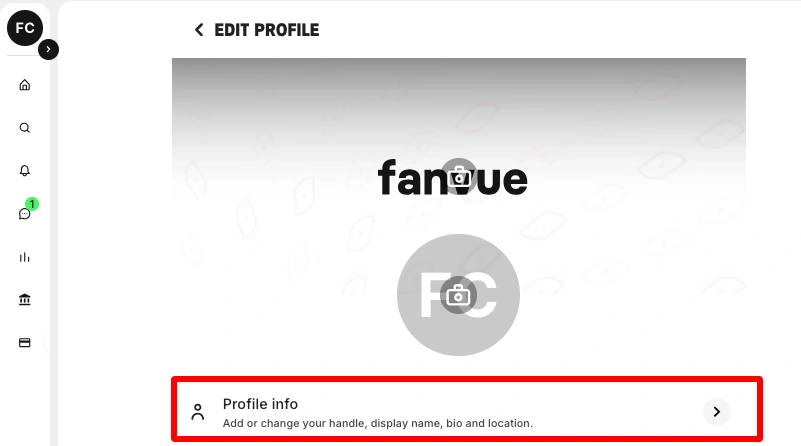
Nobody reads your full bio on the first visit. They skim the first 2–3 lines and decide. So front-load the good stuff:
Tuck your AI disclaimer under the “Show More” fold — it’s required for Fanvue compliance, but it doesn’t need to be the first thing fans read.
Intro Video (Non-Negotiable)
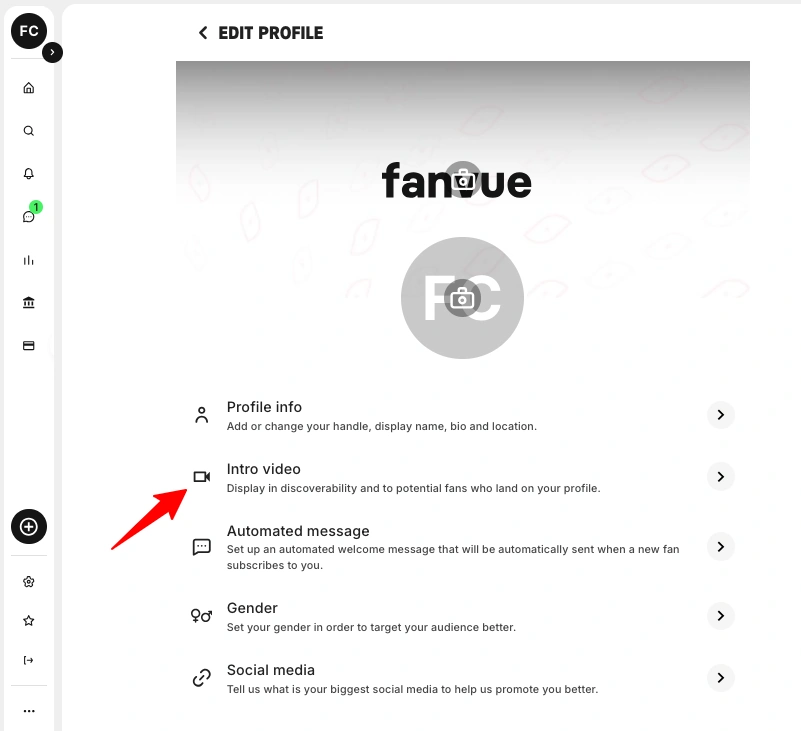
Profiles with a pinned intro video convert significantly better than those without — some creators report 35–70% higher conversion rates. Use tools like D-ID or HeyGen to generate a 15–30 second AI lip-sync clip.
Keep the script dead simple: greet the viewer, flash some personality, tell them to subscribe. Done.
The Pricing Trick That Removes All Hesitation
Your subscription price on day one has one job: remove friction.
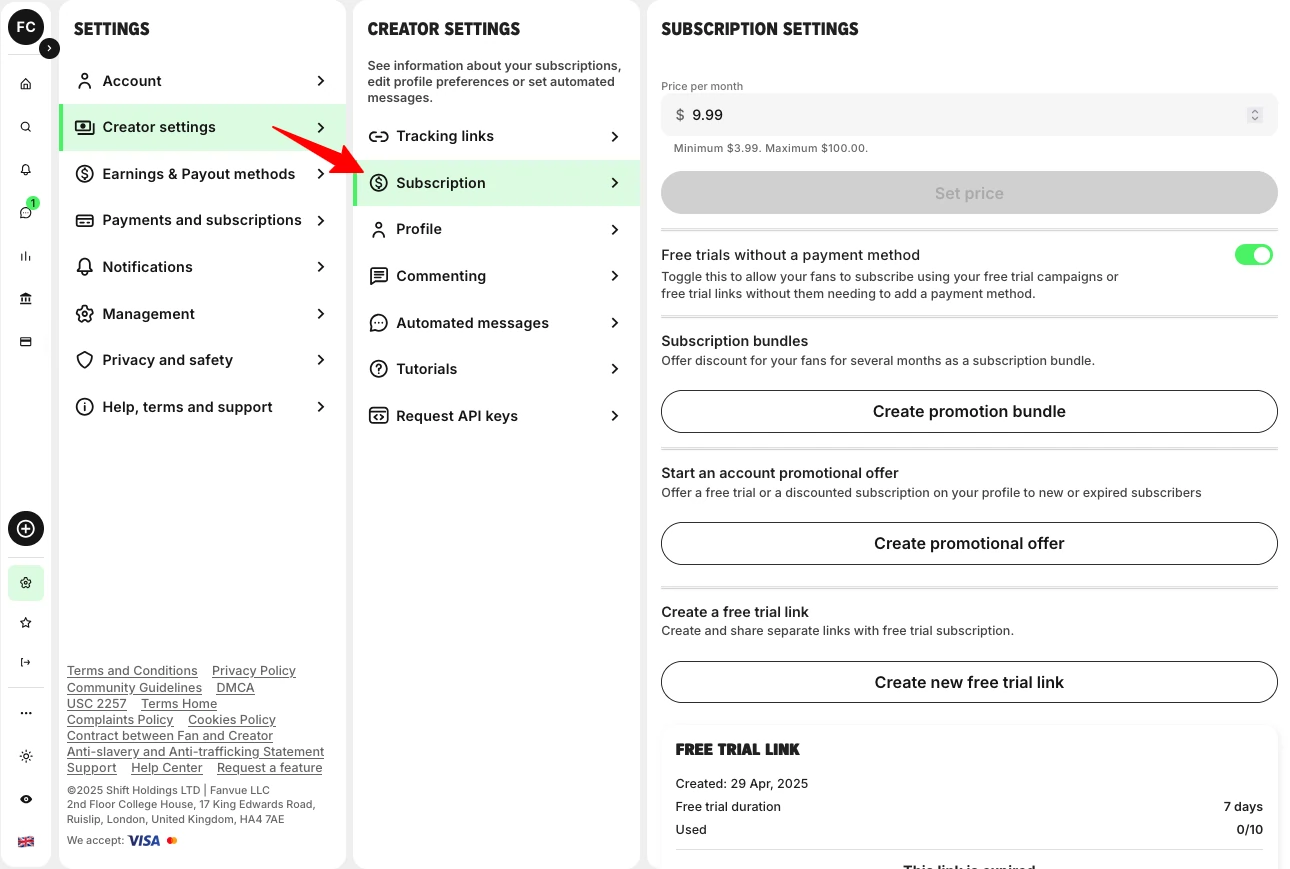
Start between $3.99–$6.99. You’re not trying to maximize revenue per subscriber right now — you’re trying to get bodies through the door. Fanvue lets you set prices anywhere from $3.99 to $100, but the sweet spot for new creators sits firmly on the lower end.
Stack a 20% discount for your first 10–20 subscribers and mention it everywhere — your bio, your socials, your DMs. Turn on Free Follow so people can preview your teaser content and warm up before committing.
Here’s what most beginners miss: the real money on Fanvue comes from PPV messages and DM upsells ($20–$500+ each), not the monthly subscription fee. Your sub price is just the door. What’s behind it is where the income actually lives.
Never Launch an Empty Page (The 50-Photo Rule)
Would you pay to subscribe to a page with 6 posts and a blurry banner? Neither would anyone else.
Before you promote your Fanvue page anywhere, upload:
With the right AI image generators, you can batch all of this in 2–4 hours. There’s no excuse to launch empty. A stacked page converts. An empty page bounces.
Pick ONE Traffic Source and Milk It Dry
You don’t need to be everywhere. You need to be relentless in one place.
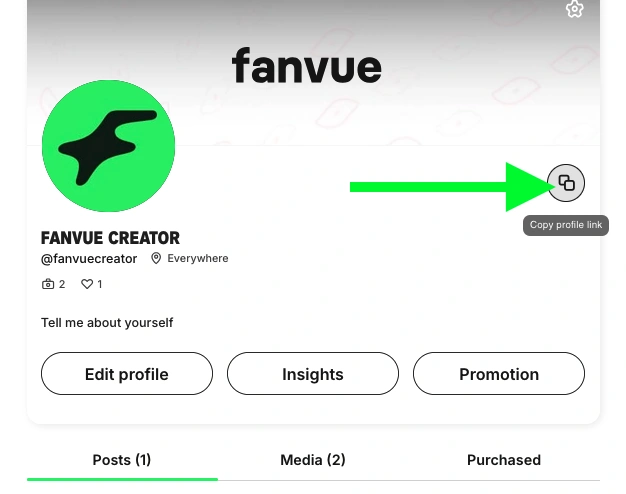
Here’s how each platform plays out for Fanvue AI creators:

Instagram Reels (Fastest Free Traffic)
Post 5–10 Reels daily. Keep them short — 7 to 15 seconds — with trending audio and a bold text hook in the first frame. Never link your Fanvue page directly in captions or comments. Use a link-in-bio tool to avoid shadowbans.

X / Twitter (Spicier Previews Allowed)
X gives you more breathing room with suggestive content. Reply to high-engagement posts in your niche with a teaser photo and something like “full version in my bio.” Pin your hottest preview with a direct Fanvue link at the top of your profile. Post 2–3 times daily: a morning teaser, a midday poll or question, and an evening direct offer.

Reddit (Free Trial Links Win Here)
Reddit is goldmine territory for Fanvue AI creators — but you need to play it right. Spend 7–10 days building karma before dropping any links. Post in niche subreddits with high-quality images and minimal captions. Always use a free trial link, not a paid subscription link. Put your Fanvue URL in your Reddit bio, not in the post itself.
The First DM That Turns a Follower Into a Subscriber
Here’s a stat that should change how you think about Fanvue: up to 80% of creator income comes from DMs, not the subscription itself.
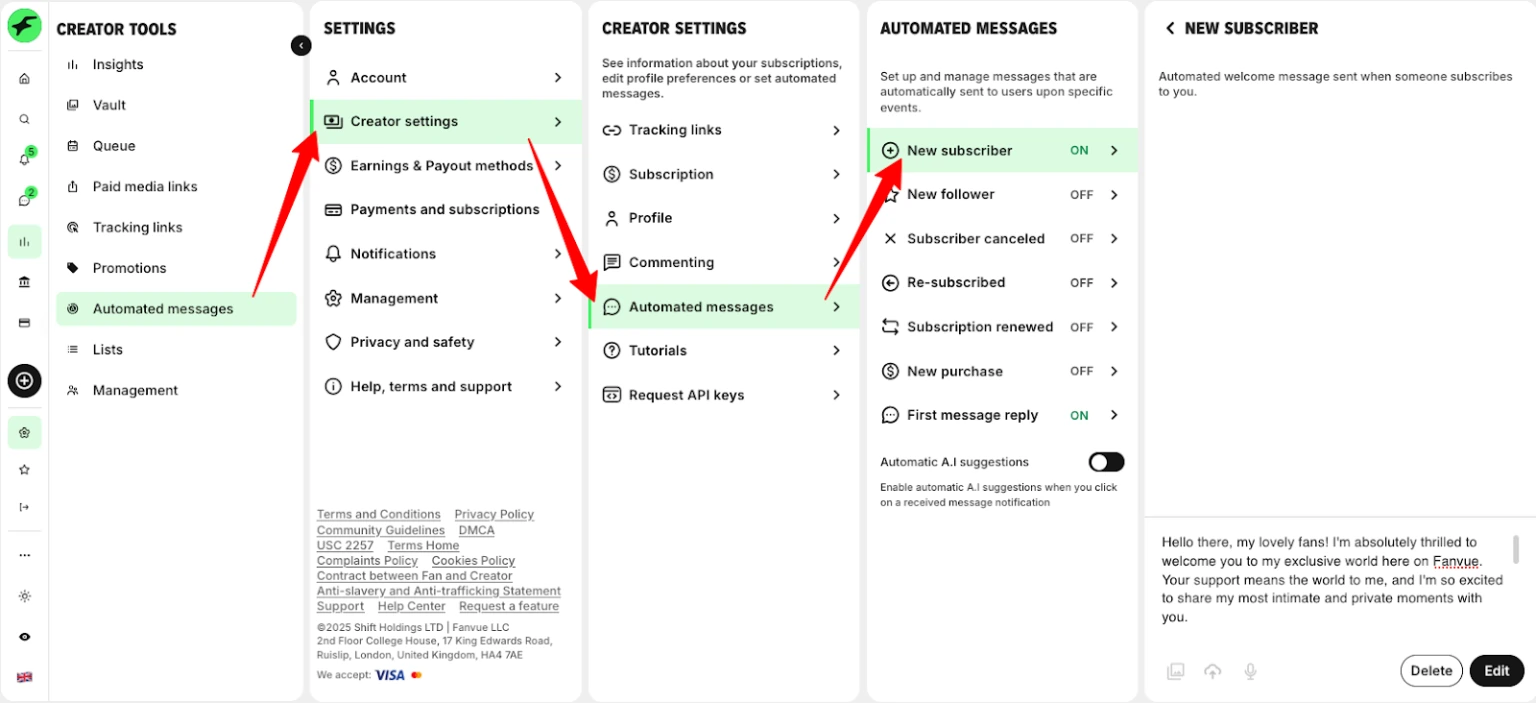
That first message to a new follower or subscriber? It’s everything.
Set up an automated welcome message, but make it feel human. End it with a question — something low-pressure like:
“Hey! So glad you found me 😊 What kind of content are you into?”
Messages that end with a question pull 70–90% reply rates compared to generic “thanks for subscribing!” blasts. Once they reply, match their energy. If they’re chatty, lean in. If they keep it short, don’t overdo it. This is where the real relationship — and the real revenue — starts.
5 Mistakes That Keep AI Creators Stuck at Zero Subscribers
Avoid these and you’re already ahead of 90% of new Fanvue AI creators:
- Launching with a half-empty page — if there’s nothing to scroll through, there’s nothing to pay for.
- Pricing too high on day one — $14.99/month with zero social proof is a hard sell. Start low.
- Sending copy-paste DM blasts — fans can smell automation from a mile away. Personalize or don’t bother.
- Posting randomly with no schedule — consistency beats quality when starting out. Aim for 1–2 Fanvue posts daily.
- Waiting to feel “ready” — perfectionism kills more Fanvue pages than bad content ever will. Go live and fix as you go.
FAQ — Getting Your First Subscriber on Fanvue
Is AI content actually allowed on Fanvue?
Yes — Fanvue is one of the few platforms that officially supports and verifies AI creators. They have a dedicated onboarding and verification process built specifically for it.
How much does Fanvue take from creators?
Fanvue keeps 20% of all earnings. You take home 80%, which is competitive with other major creator platforms.
How often should an AI creator post on Fanvue?
At least 1–2 times daily on your Fanvue page, plus 2–3 SFW posts on your traffic channels to keep new fans flowing in.
Can I run multiple AI creator accounts on Fanvue?
Yes. After passing KYC verification, you can set up separate pages for different AI characters — each with its own niche, identity, and subscriber base.
Your Next Move Starts Today
Your first subscriber on Fanvue isn’t going to show up by accident. And no amount of reading guides will replace actually doing the work.
So here’s your move for this week: pick your AI character, batch your first 50 images, set your price at $4.99, and go live before Sunday. Not next month. Not when everything feels perfect. This week.
The creators making real money on Fanvue right now aren’t smarter than you — they just started before they felt ready.

AITwin Ninja
Affiliate Disclosure: This post may contain some affiliate links, which means we may receive a commission if you purchase something that we recommend at no additional cost for you (none whatsoever!)
Similar Posts
Author
Andrea Obrien
I specialise in writing about AI influencers and AI agents, empowering creators to build sustainable online incomes. Outside of work, I enjoy travelling, photography, and exploring the latest trends in digital innovation.