OpenArt Review 2026: I Ran 400+ Generations So You Don’t Waste Your Credits
A creator, a shoot, an editor, a voice actor, a translator. I replaced all five with one browser tab and finished a UGC ad in under three hours. Here’s exactly what OpenArt did well, what quietly ate my credits, and who should actually pay for it.

By :
Anthony
September 10, 2026
Most people searching for an OpenArt review are asking one very specific question: is this thing actually going to replace the four AI subscriptions I’m already paying for, or is it just a pretty wrapper around models I can get elsewhere?
Fair question. And the answer is more interesting than “yes” or “no.”
OpenArt sells itself as an all-in-one AI creator studio — images, video, characters, audio, 3D worlds, brand kits, the works.
In 2026 it added a conversational video tool called Director, rebuilt its consistent character system, wired in Seedance 2.5, Kling 3.0 Omni, Sora 2, Veo 3.1, Nano Banana 2, GPT Image 2 and Wan 3.0, and started shipping features at a pace that makes the changelog genuinely hard to read in one sitting.
It’s also the platform with some of the loudest complaints on Trustpilot about credits vanishing and support tickets going cold for six weeks.
Both things are true at once. That’s what makes this worth writing about properly.
I spent a full billing cycle inside the platform: character builds, UGC ad tests, product videos, storyboards, upscales, music videos, lip sync, dubbing, the lot. Below is what held up, what burned credits for nothing, what the pricing page doesn’t spell out, and exactly which type of creator should hand over money here.
OpenArt at a Glance: Ratings, Pricing, and Who It’s Built For
| What You’re Checking | The Short Answer |
|---|---|
| Product type | All-in-one AI image, video, audio and character studio (browser-based) |
| Founded | 2022, by ex-Google engineers Coco Mao (CEO) and John Qiao (CTO) |
| Best for | Solo creators, UGC/ad shops, AI influencers, short-film makers, small brand teams |
| Model library | 100+ premium image, video and audio models under one credit pool |
| Headline 2026 features | Director, Character 2.0, Smart Shot, OpenArt VFX, Worlds, Brand Kit, Video Dubbing, OpenArt MCP |
| Free plan | Yes — 40 one-time trial credits (plus bonus credits via Discord) |
| Paid plans (annual) | Starter $13 · Plus $27 · Pro $44 · Wonder $175 per seat/month |
| Paid plans (monthly) | Starter $14 · Plus $34 · Pro $56 · Wonder $240 per seat/month |
| Commercial use rights | Plus tier and above only — not on Starter |
| Watermarks | Removed on every paid tier |
| Add-on credits | $15/month for 5,000 extra credits (Plus and up) |
| Mobile app | None — web only |
| Image quality score | 9/10 |
| Video quality score | 9/10 |
| Character consistency | 9.5/10 |
| Value for money | 7.5/10 |
| Billing & support | 5/10 |
| Overall verdict | 8.4/10 — buy monthly first, commit annually later |
So What Is OpenArt, Exactly?
Here’s the mental model that makes everything click: OpenArt doesn’t build its own foundation models. It aggregates them.
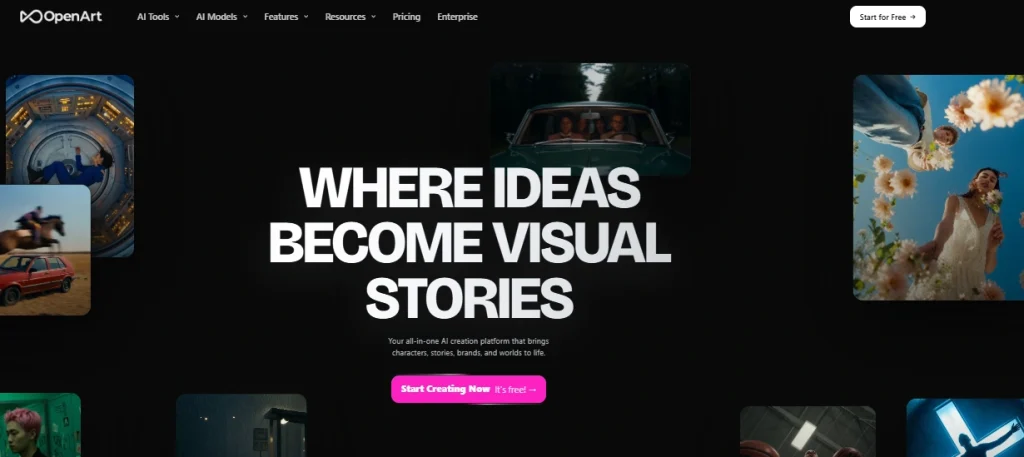
Instead of training one house model and forcing you to work in that style forever, OpenArt licenses the best image and video engines available and puts them behind a single credit balance. One prompt bar. One asset library. One bill.
That means in a single session you can:
Without downloading a single file or opening a second tab.
The competitor comparison people always reach for is Midjourney. That’s the wrong frame. Midjourney is a specialist with a signature aesthetic. OpenArt is a production workspace — closer in spirit to a browser-based studio than to an AI art generator.
Who this platform is genuinely built for
Who’s going to be annoyed
Turn Ideas Into Content — Save 15% on OpenArt
Create More, Pay 15% Less — Bring your entire AI creative workflow into one place and save 15% with code ALL15.
Everything OpenArt Shipped Recently (And What Actually Matters)
The changelog moves fast. Here’s the honest triage — what’s meaningful versus what’s a press release.
| Date | Update | Does It Matter? |
|---|---|---|
| Aug 2026 | Video Dubbing — translate a video with natural voices and matched mouth movement | Huge. Instant multi-language reach for creators |
| Aug 2026 | Wan 3.0 + unlimited windows on Pro/Wonder | Yes, if you’re on higher tiers |
| Aug 2026 | Seedance 2.5 — expressive motion, better camera work, steadier characters | Huge. Currently the best default video model here |
| Jun 2026 | OpenArt Director — chat your way to a finished film | The flagship. Explained in detail below |
| Jun 2026 | Director 1080p Lite & 720p Lite — up to 50% cheaper generations | Very welcome, credits go further |
| May 2026 | OpenArt VFX — background replace, scene relight, region-level effects on existing footage | Big for anyone with real footage |
| May 2026 | Smart Shot — one prompt, full multi-shot plan, cinematic sequence | Saves genuine storyboarding hours |
| Apr 2026 | GPT Image 2 — readable text, cinematic framing, production-ready edits | Best-in-class for typography on images |
| Apr 2026 | Seedance 2.0 to all users | Superseded by 2.5 |
| Feb 2026 | OpenArt Suite — unified workspace, @Character and @Image referencing, shared asset library | Quietly the most important UX shift of the year |
| Feb 2026 | Kling 3.0 & Kling 3.0 Omni — native audio, multi-shot narratives | Strong for longer sequences |
| Dec 2025 | Character 2.0 — 10x more consistent, one reference image needed | Marquee feature, and controversial (more below) |
| Nov 2025 | Nano Banana Pro, FLUX.2, Camera Angle Control | Solid image-side upgrades |
| Oct 2025 | Sora 2, Veo 3.1, Motion Sync | Model breadth arms race |
Two takeaways from that list.
OpenArt Director: The Feature That Justifies the Subscription
If you only test one thing on a trial account, make it Director.
Traditional AI video generation is a slot machine. You write a prompt, you get four seconds, the character’s face changes, you rewrite the prompt, you burn credits, repeat until you give up or run dry.
Director works like a conversation with an editor who remembers everything.
You describe the film you want — story, cast, mood, pacing, language, aspect ratio. Director drafts a shot plan. You talk back:
It rebuilds only what changed and keeps the rest coherent.
OpenArt calls this vibe directing, and honestly, the term fits. You stay in the creative seat instead of adapting yourself to a fragmented, step-by-step tool.
What Director can produce out of the box
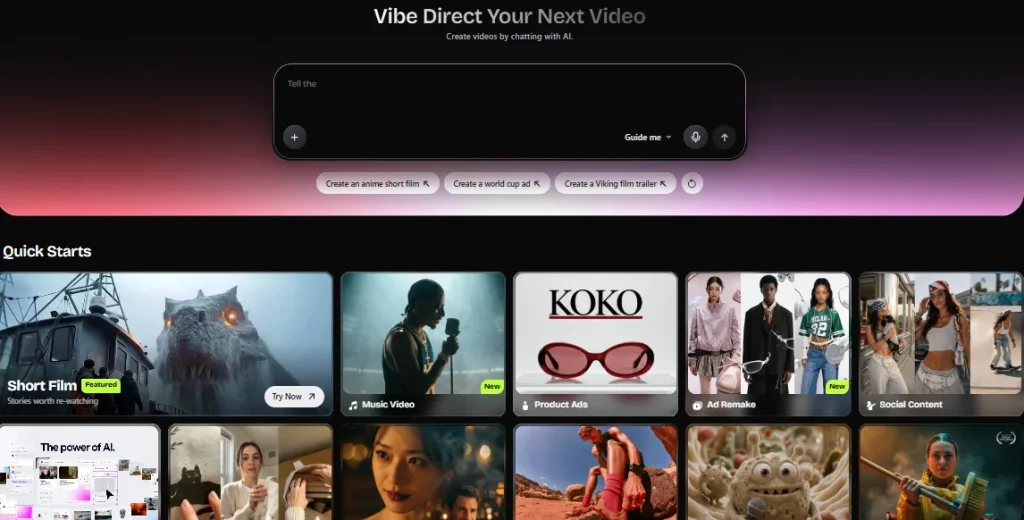
The tool ships with quick-start modes, which removes a lot of blank-page paralysis:
| Quick-Start Mode | Typical Use Case |
|---|---|
| Short Film | Narrative pieces worth rewatching |
| Music Video | Beat-synced visuals for a finished track |
| UGC Ads | Creator-style ads that don’t look like ads |
| Product Ads | Polished campaign spots from a single product photo |
| Film Trailer | Cinematic cut-downs with rising tension |
| Social Content | On-trend clips sized for every feed |
| Micro Drama | Episodic vertical drama with a fixed cast |
| Explainer | Product and concept walkthroughs with narration |
| Branding Ads | On-brand variants at volume |
| Ad Remake | Upload a competitor’s winning ad, rebuild it with your product |
That last one — Ad Remake — is criminally under-discussed. You feed it an ad that’s already performing, and it reconstructs the structure with your product, your characters, your language, your styling. For performance marketers, that’s a creative-testing loop that used to require a production crew.
Real-world Director results
Across roughly 30 Director runs, here’s what I saw:
Workflow tip that saved me hundreds of credits: block out your entire film in 720p Lite, lock the shot plan, then re-render only the final approved sequence at full quality. Drafting at premium quality is the single fastest way to empty a Starter plan.
Character 2.0 and Consistency: The Reason Most People Sign Up
Face drift is the reason most AI content looks amateur. Your protagonist has a different nose in shot four. Your AI influencer ages five years between posts. Your mascot’s logo warps every time the camera moves.
OpenArt’s Character system exists to kill that problem, and in its 2.0 form it mostly does.
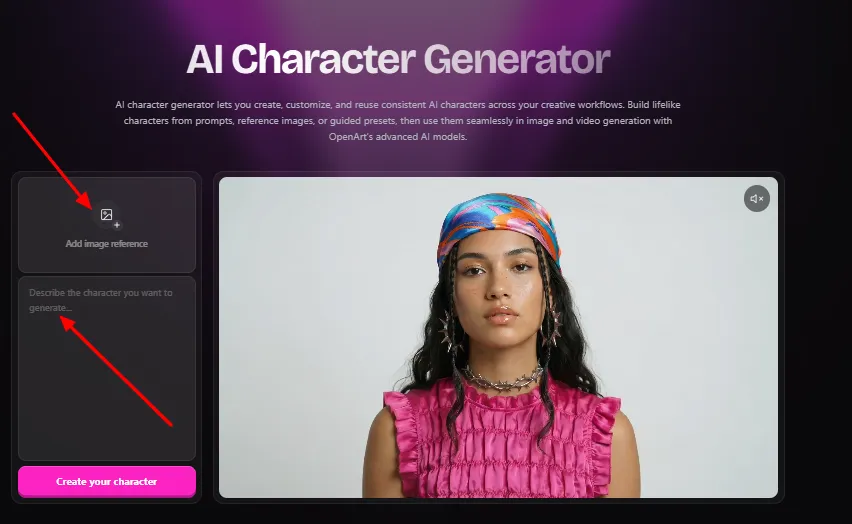
What’s different in Character 2.0:
Once a character exists, you reference it directly in prompts with @Character syntax, the same way you’d tag someone in a doc. Same for saved backgrounds, objects and styles via @Image. Build once, reuse across every image and video you make afterwards.
Paired with Worlds — which turns a still image into a navigable 3D scene — you get something closer to a persistent set than a series of one-off generations. Your character walks through the same coffee shop in episode one and episode six, and it actually looks like the same coffee shop.
Honest note: the Character 2.0 rollout wasn’t smooth. Users with large existing character libraries reported having to pay to upgrade older characters before using them in video, and some flagged that outputs felt more generic regardless of reference quality. If you built a big library on the old system, budget credits for the migration.
Consistency scorecard from my testing
| Scenario | Result |
|---|---|
| Same face across 20 stills | Excellent |
| Same face across a 6-shot video sequence | Very good |
| Non-human mascot across scenes | Good |
| Complex costume detail (patterns, badges) | Mixed |
| Multiple characters in one frame | Good, with occasional feature bleed |
| Character in extreme lighting change | Very good |
The Model Library: 100+ Engines, One Credit Pool
This is the structural advantage. Instead of subscribing to four platforms, you pick the right engine per job.
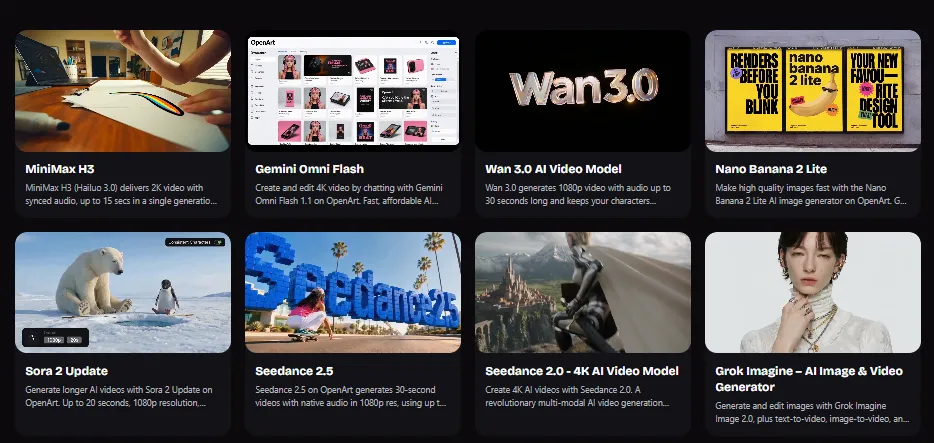
Seedance 2.5 · Seedance 2.0 · Kling 3.0 · Kling 3.0 Omni · Sora 2 (Fast and Pro) · Veo 3.1 · Wan 3.0 · Wan 2.7 · LTX-2.3 · MiniMax H3 · Hailuo 2.3 · Pixverse · SwitchX · HappyHorse · Gemini Omni Flash
Nano Banana 2 · Nano Banana Pro · GPT Image 2 · Seedream 5.0 Pro · Qwen Image 3 · FLUX.2 · Flux Kontext · Grok Imagine · Ideogram V3 · SDXL and Stable Diffusion variants · OpenArt Photorealistic
Google Lyria 3 for music, ElevenLabs-powered speech, plus sound effects and ambient generation.
Which model to reach for
| Your Job | Reach For |
|---|---|
| Poster, logo, packaging, anything with readable text | GPT Image 2 or Nano Banana Pro |
| Photoreal portraits and product shots | Nano Banana 2 or OpenArt Photorealistic |
| Cinematic motion with expressive characters | Seedance 2.5 |
| Longer multi-shot narrative with native audio | Kling 3.0 Omni |
| Physics-heavy realism and dialogue | Sora 2 or Veo 3.1 |
| Fast, cheap iteration drafts | Wan 3.0 or Hailuo 2.3 Fast mode |
| Precise editing that preserves brand assets | FLUX.2 or Flux Kontext |
Keeping this mapping in your head is worth real money. Running a draft on a premium model when a fast model would have answered the question is how people accidentally spend $50 in an afternoon.
Video Tooling Beyond Generation
Generating clips is table stakes now. The editing layer is where OpenArt separates itself from single-purpose tools.
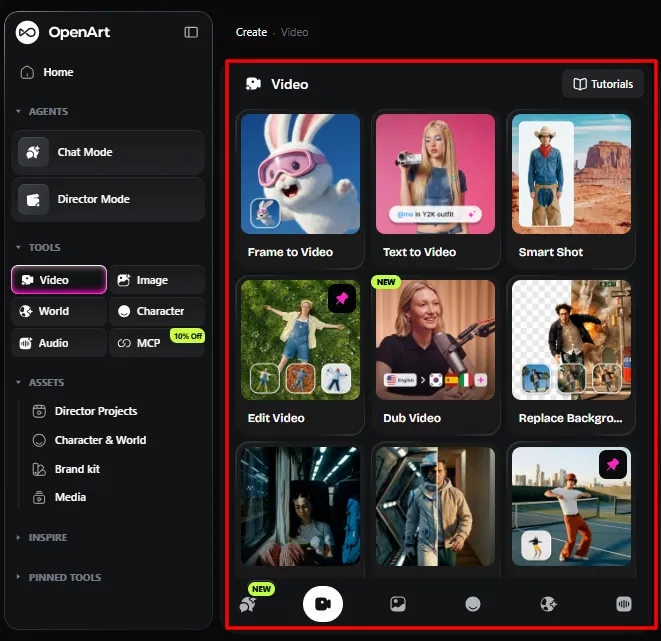
Here’s the practical point: nothing leaves the platform mid-project. No exporting to a video editor, no re-uploading, no version chaos in a downloads folder. That workflow continuity is worth more than any individual feature on the list.
The Image Side: Still Excellent, Now Overshadowed
OpenArt started as an image platform, and that heritage shows in how deep the still-image tooling goes.
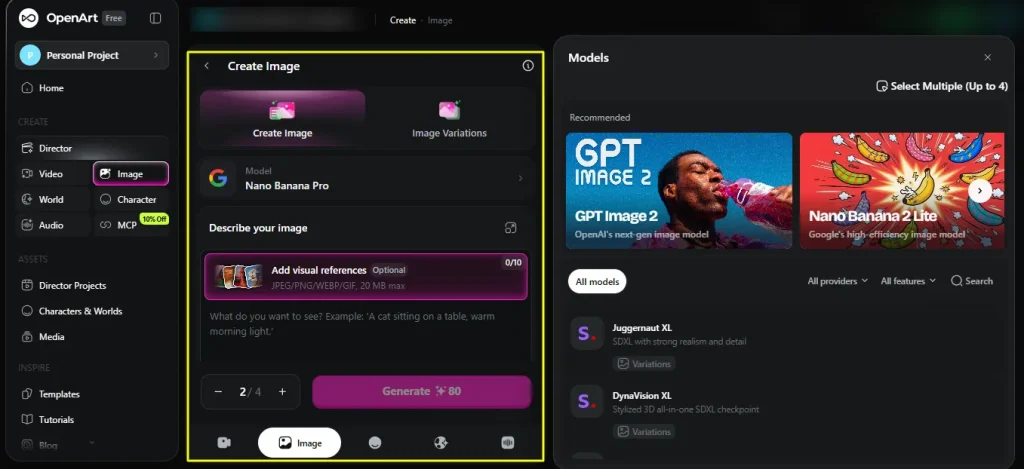
Generation controls: model choice, aspect ratio, resolution up to 4K, seed reuse for repeatable results, negative prompting, multi-image referencing, and multilingual prompts.
Editing suite:
Personalized model training: upload your own images and train a model on your product, mascot, style or subject. Higher tiers accept up to 500 images and 5,000 training steps, which is enough for a properly refined style model rather than a rough approximation. For brand managers this is the feature that moves OpenArt from “fun tool” to “asset production.”
Seed control deserves a specific mention. Being able to lock and reuse a seed means visual consistency across a campaign or content series, not just within a single session. Most beginners overlook it. Anyone building a recurring content brand shouldn’t.
Brand Kit, MCP and the Business Features
Two additions signal where OpenArt is heading.
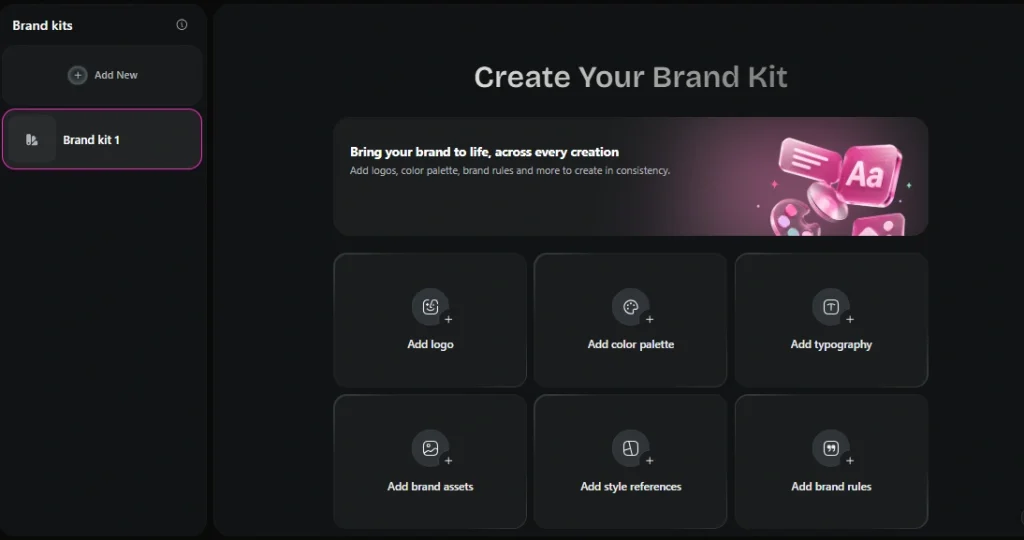
AI Brand Kit — save your logo, colour palette, fonts and brand rules once, then have them applied automatically to every image and video you generate afterwards. For agencies producing dozens of variants per campaign, this removes the single most tedious QA step: checking that nothing drifted off-brand.
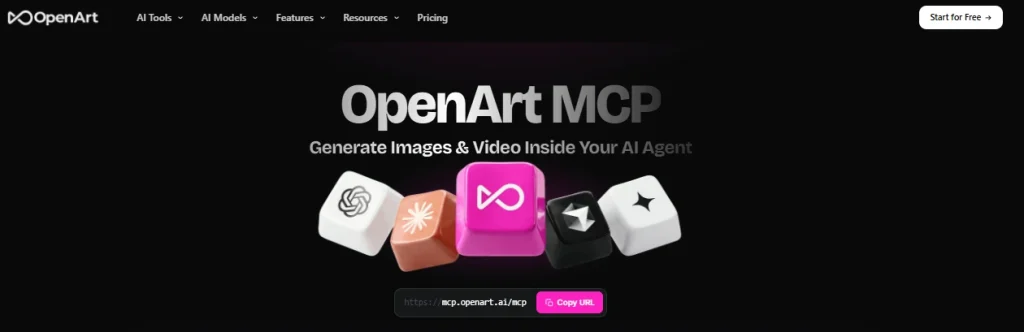
OpenArt MCP — available on every paid tier, this lets you generate images and video from inside your own AI agent or automation stack. If you’re running content pipelines through an assistant or a workflow tool, OpenArt becomes a callable service rather than a destination you visit. This is genuinely forward-looking and almost nobody reviewing the platform mentions it.
AI Copyright & IP Check — scan generated images for brand similarity, famous-face likeness and infringement risk before publishing commercially. Given that AI image platforms have already been sued over IP, having a risk check built into the workflow is a meaningful safety net. Use it before any paid campaign goes live.
Team billing — invite teammates by email and cover every seat on one invoice. Business plans add pooled credits, shared workspaces and priority support.
OpenArt Pricing 2026: The Numbers, Then the Math Nobody Shows You
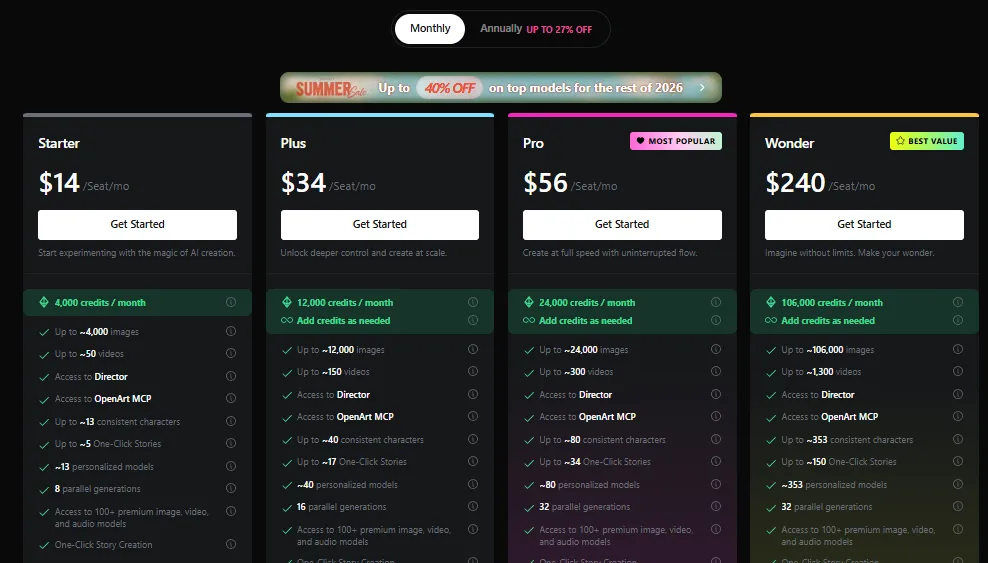
Everything runs on credits. One pool covers images, video, audio, characters, training and editing.
| Plan | Monthly | Annual (per seat/mo) | Credits/mo | Approx. Images | Approx. Videos | Parallel Gens | Commercial Use |
|---|---|---|---|---|---|---|---|
| Free | $0 | $0 | 40 one-time | ~40 | Minimal | Limited | No |
| Starter | $14 | $13 | 4,000 | ~4,000 | ~50 | 8 | No |
| Plus | $34 | $27 | 12,000 | ~12,000 | ~150 | 16 | Yes |
| Pro | $56 | $44 | 24,000 | ~24,000 | ~300 | 32 | Yes |
| Wonder | $240 | $175 | 106,000 | ~106,000 | ~1,300 | 32 | Yes |
Add-on: Extra Credit at $15/month for 5,000 additional credits, available from Plus upward.
Every paid tier includes access to the 100+ model library, Director, OpenArt MCP, One-Click Story, the image editing suite, and watermark-free exports. Pro and Wonder add priority support. Wonder adds Unlimited Creation windows on selected models.
Upgrade Your AI Toolkit With OpenArt — Save 15%
Get access to 100+ AI models, advanced creation tools, and watermark-free exports. Apply ALL15 for 15% off.
Three things the pricing table doesn’t tell you
Cost-per-asset reality check
| Output | Rough Credit Cost | Effective Cost on Plus (annual) |
|---|---|---|
| Standard image, light model | ~1 credit | Fractions of a cent |
| Premium image, top model | ~4-10 credits | Still cents |
| Character creation | Moderate | Cheap enough to build a full cast |
| Model training run | 50-300+ credits | Reasonable for a reusable asset |
| Short video, fast model | Low-moderate | A few cents |
| Premium video, top model, high res | Heavy | This is where budgets die |
| Director film, Lite quality | ~50% of standard | Draft here, always |
| 4K/8K upscale | Additional | Final passes only |
Check the in-app credit display before every run. Costs shift as models are added and repriced, and the number on screen is the only one that counts.
Pros and Cons: The Balanced View
What OpenArt does genuinely well
Where it falls short
The Complaints You Should Know About Before Paying
An OpenArt review that skips this section isn’t a review, it’s an affiliate page. Here’s what independent user feedback consistently surfaces.
Credit disputes. Multiple Trustpilot reviewers describe purchased add-on credit packs disappearing from their accounts, with support responding about subscription credits instead of the purchased ones. One documented case ran six weeks without resolution.
Credits deducted for failed generations. Reported across several Reddit threads — a generation errors out, the credits are gone anyway, and recovery requires contacting support.
Cancellation friction. Plan changes have to be made manually through Account Settings or by emailing support. Several users reported charges after cancellation, and complaints have been filed with the BBB.
Support response times. Measured in weeks by more than one reviewer, even on paid tiers. Pro and Wonder include priority support, which appears to genuinely help.
Character 2.0 backlash. The upgrade retroactively gated some existing character work behind new costs.
How to protect yourself
- Start on monthly billing. Validate your actual usage for one cycle before committing to a year. The annual discount breaks even at roughly six months, so you lose very little by waiting.
- Screenshot everything. Plan confirmations, credit balances after purchase, cancellation confirmations.
- Check your card the month after any plan change.
- Buy add-on credits in small amounts rather than stockpiling.
- Track your own credit ledger for the first month. If the numbers drift, you’ll have evidence rather than a vague feeling.
None of this means the product is a scam. It’s a real platform with real capability and real community frustration about execution. Those coexist more often than people admit.
OpenArt vs the Alternatives
| Platform | Strongest At | Weakest At | Entry Price | Pick It If |
|---|---|---|---|---|
| OpenArt | Breadth, character consistency, video editing, one workspace | Billing trust, credit predictability | $13/mo annual | You need images + video + audio in one place |
| Midjourney | Artistic ceiling, signature aesthetic, uncapped relax generation | No video suite, no editing layer | $10/mo | Still images are your entire output |
| Leonardo AI | Generous daily free credits, game-asset workflows | Thinner video tooling | Free tier | You want to work heavily without paying |
| Runway | Professional video editing, film-grade control | Costs more, narrower image tools | Higher | Video is your only job and budget is fine |
| Adobe Firefly | Commercial safety, Creative Cloud integration | Fewer models, more conservative outputs | Bundled | You’re already deep in Adobe |
| Higgsfield | Motion presets and camera control | Less breadth overall | Comparable | Stylized motion is your priority |
The honest positioning: pick OpenArt for consolidation. Pick a specialist if you only do one thing and you do it at a very high level. If you’re currently paying for an image generator, a video generator, an upscaler and a voice tool separately, OpenArt on Plus or Pro will almost certainly cost less than the sum.
Hands-On: A Real Workflow, Start to Finish
To make this concrete, here’s an actual UGC ad I produced inside the platform, step by step.
- Step 1 — Build the creator. One reference image into Character 2.0. Named her, saved her. Total time: under two minutes.
- Step 2 — Set the scene. Uploaded a product photo, used the image editor to place it in a kitchen background. Saved the background as a reusable @Image asset.
- Step 3 — Write the brief in Director. Described the ad in plain language: hook, problem, product reveal, call to action, casual creator tone, 9:16, 30 seconds. Director returned a shot plan.
- Step 4 — Revise by chatting. Asked for a tighter hook, a closer product shot on beat three, and a warmer colour grade. Director rebuilt only those beats.
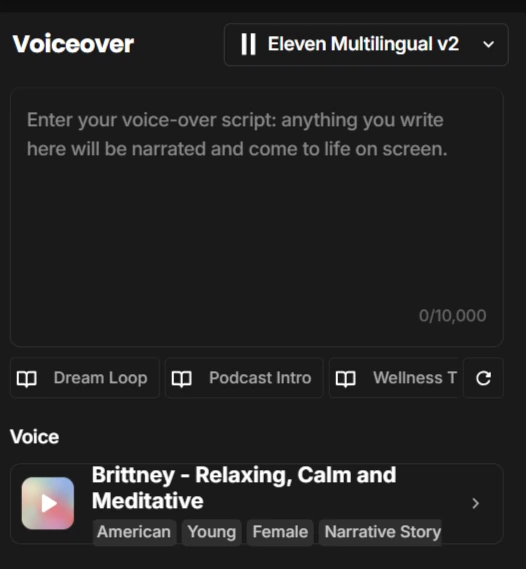
- Step 5 — Add voice. Generated the voiceover with text-to-speech, then lip synced it to the character.
- Step 6 — Render at Lite, review, then final. Full sequence at 720p Lite for approval. Only the locked version went to full quality.
- Step 7 — Localize. Ran the finished ad through Video Dubbing into two more languages. Same performance, matched mouth movement.
- Step 8 — IP check, then export. Ran the copyright check, exported watermark-free.
Total elapsed time: under three hours, including revisions. The traditional version of this involves a creator, a shoot, an editor, a voice actor and a translator.
That’s the actual argument for the platform. Not any single feature — the collapse of an entire production chain into one browser tab.
Nine Ways to Stop Wasting OpenArt Credits
- Draft in Lite quality. Director’s 1080p Lite and 720p Lite run up to 50% cheaper. Approve the edit, then render final.
- Use fast models for iteration. Wan 3.0 and Hailuo Fast mode exist for exploration. Save Sora 2 and Veo 3.1 for finals.
- Lock your seed once you find a look you like, instead of regenerating and hoping.
- Build characters once and reuse them. Rebuilding a character every project is pure waste.
- Use Smart Shot instead of guessing angles. One planned sequence beats twelve failed single shots.
- Save backgrounds and styles as assets. Reference them with @Image rather than re-prompting them.
- Set up your Brand Kit on day one. Every off-brand render is a credit you paid for and can’t use.
- Upscale only finals. 4K and 8K passes on drafts are money on fire.
- Watch for unlimited-generation windows. OpenArt frequently runs unlimited periods on specific models for Pro and Wonder subscribers. Batch your heavy work into those windows.
Is OpenArt Worth It in 2026? The Verdict
The product is strong. The pace of feature delivery is remarkable. The billing and support experience is the weak link, and it’s a real one. Start monthly, verify your credit consumption against your own tracking, and upgrade to annual once you trust the numbers.
OpenArt Review FAQs
Is OpenArt free to use?
Partly. The free plan gives you 40 one-time trial credits, with additional bonus credits available for joining the Discord community. That’s enough to test basic generation, not enough to evaluate a full workflow. Real usage requires a paid plan.
How much does OpenArt cost in 2026?
Annual billing runs $13/month for Starter, $27 for Plus, $44 for Pro and $175 for Wonder, per seat. Monthly billing costs $14, $34, $56 and $240 respectively. There’s also a $15/month add-on for 5,000 extra credits and a separate set of business plans.
Does OpenArt allow commercial use?
Only on Plus, Pro and Wonder. The Starter plan does not include commercial use rights, which makes it unsuitable for client work, monetized channels or paid advertising. All paid tiers are watermark-free.
What is OpenArt Director?
Director is a conversational video tool where you describe your film in plain language and refine it by chatting. It builds a shot plan, holds characters and visual style consistent across scenes, and produces finished multi-scene video with synced audio. It’s available on every paid tier.
Do OpenArt credits roll over?
Monthly subscription credits reset each cycle and do not carry forward. Purchased add-on credits are handled differently, though some users have reported discrepancies, so track your balances.
Which AI models does OpenArt include?
Over 100, including Seedance 2.5, Kling 3.0 and 3.0 Omni, Sora 2, Veo 3.1, Wan 3.0, MiniMax H3 and LTX-2.3 for video, plus Nano Banana 2 and Pro, GPT Image 2, Seedream 5.0 Pro, Qwen Image 3, FLUX.2 and Grok Imagine for images. Audio runs on Google Lyria 3 and ElevenLabs-powered speech.
Is OpenArt better than Midjourney?
They solve different problems. Midjourney has the higher artistic ceiling for still images and offers uncapped generation in relax mode. OpenArt offers video, audio, character consistency, editing and 100+ models under one subscription. For consolidation, OpenArt wins. For pure image artistry, Midjourney still leads on aesthetic refinement.
Can I train my own model on OpenArt?
Yes. Upload your own images and train a personalized model on a product, mascot, subject or style. Higher tiers support up to 500 images and 5,000 training steps. Training consumes credits, typically 50 to 300+ depending on scope.
Does OpenArt have a mobile app?
No. It’s web only. Everything runs in the browser with no install and no local GPU required, but there’s no native iOS or Android app.
How do I cancel an OpenArt subscription?
Through Account Settings, or by emailing support. Take a screenshot of the confirmation and check your payment method the following month — post-cancellation charges have been reported by multiple users.
Is OpenArt safe for commercial and brand work?
On Plus and above, yes, with a caveat. The platform includes an AI Copyright & IP Check that scans for brand similarity and famous-face likeness before you publish. Use it. Avoid generating recognizable copyrighted characters, since AI platforms have already faced litigation over exactly that.
What’s the best OpenArt plan for beginners?
Plus at $27/month annually. Starter is cheaper but lacks commercial rights, and 4,000 credits disappear quickly once you start generating video. Plus gives you 12,000 credits, commercial use, add-on capability and 16 parallel generations.
Can OpenArt make videos with sound?
Yes. Several models generate native audio, meaning dialogue, sound effects and ambience arrive with the visuals rather than being added afterwards. You can also generate voiceovers, music via Lyria 3, and dub finished videos into other languages with matched lip movement.
How long can OpenArt videos be?
Individual clips run up to 15 seconds in up to 4K. Director sequences string multiple scenes together into films that run several minutes with consistent characters and continuous audio.
Final Thoughts
OpenArt in 2026 is the closest thing to a complete AI production studio that runs in a browser tab. Director alone changes how video gets made, Character 2.0 solves the consistency problem that makes most AI content look cheap, and the 100+ model library means you’re never locked into one engine’s limitations.
The friction is real, though. Credits move, support is slow, and the cheapest plan quietly withholds the one right that matters for professional work. Go in with your eyes open: start on monthly, track your credit consumption yourself, keep receipts, and switch to annual once the numbers behave.
Do that, and this is one of the strongest value propositions in AI content creation right now. Skip that, and you’ll be another Trustpilot review.
For creators who need images, video, characters, voice and editing without juggling five logins and five invoices, OpenArt earns its place. Just buy it carefully.

AITwin Ninja
Affiliate Disclosure: This post may contain some affiliate links, which means we may receive a commission if you purchase something that we recommend at no additional cost for you (none whatsoever!)
Similar Posts
Author
Anthony
Anthony, a content strategist for AI Twin, is fascinated by AI’s creative potential. He specializes in exploring how generative tools are revolutionizing art, writing, and digital content creation, providing practical insights for creators and entrepreneurs.